Sirens

Sirens on SEED

Sirens is a society on SEED, Klang Games' society-sim MMO, settled on Arenosa island. Each of us picks one line of work, such as farming, metalwork, lumber, baking, or medicine, and we trade with each other for the rest. Anyone who gets hurt can go to our clinic for treatment. The society also grew out of the Sirens Discord community, which plays other games together too.

Arrow keys or swipe

Joining Sirens

Who it is for

Sirens fits you if you want to take on one job and get good at it, and you would rather trade with neighbors than do everything yourself. It also fits if you play in short sessions around work, kids, or sleep. Your Seedling keeps working on its schedule while you are away.

As of

What it costs

SEED is in early access and the Starter Pack is $29.99 (about 35 GBP in the UK). If your Seedling collapses and nobody revives it within 24 real hours, it dies. A daily check from the free phone app covers that, and the player guide shows how to set a schedule that gets your Seedling through a whole day without you.

Playing a Seedling

Can I play mostly AFK?

Yes, once the schedule is set up. Seedlings run whatever schedule you give them, for days if it is good, and jobs added to tables get done. The first sessions are hands-on, though.

As of

No priorities, no direction
A Seedling with no priorities chooses freely, and the game warns it is unlikely to be productive. A schedule is timed blocks, each with a place and a ranked list of priorities.
Early game is the active part
You build the first schedule, mark resources, and place tents and crafted items by hand.
Look in often at first
Unwatched Seedlings drift off task, stall on jammed storage, and can fill every storage with ore overnight. A tired Seedling stops working while its queue keeps cycling. Check the schedule several times a day at first.
The one hard limit
A collapsed Seedling dies after 24 real hours without a revive. Before you log off covers it.

Give your Seedling a time and a place to be, every day

Make a Schedule Block

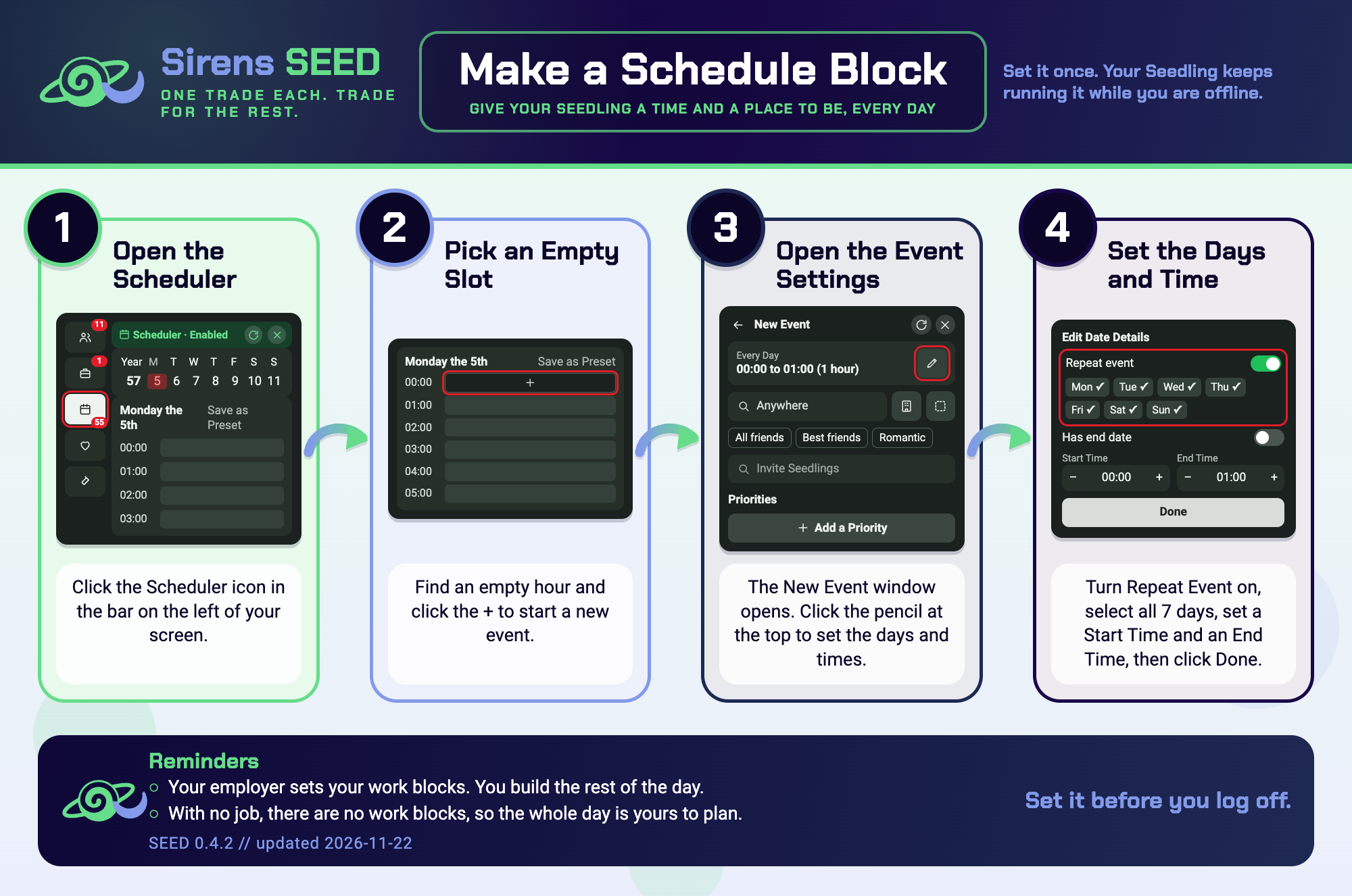
Make a Schedule Block. Give your Seedling a time and a place to be, every day

1Open the Scheduler

Click the Scheduler icon in the bar on the left of your screen.

2Pick an Empty Slot

Find an empty hour and click the + to start a new event.

3Open the Event Settings

The New Event window opens. Click the pencil at the top to set the days and times.

4Set the Days and Time

Turn Repeat Event on, select all 7 days, set a Start Time and an End Time, then click Done.

Reminders

  • Your employer sets your work blocks. You build the rest of the day.
  • With no job, there are no work blocks, so the whole day is yours to plan.

Set it before you log off.

SEED 0.4.2 // updated 2026-11-22

Tell your Seedling where to go for this block

Choose a Location

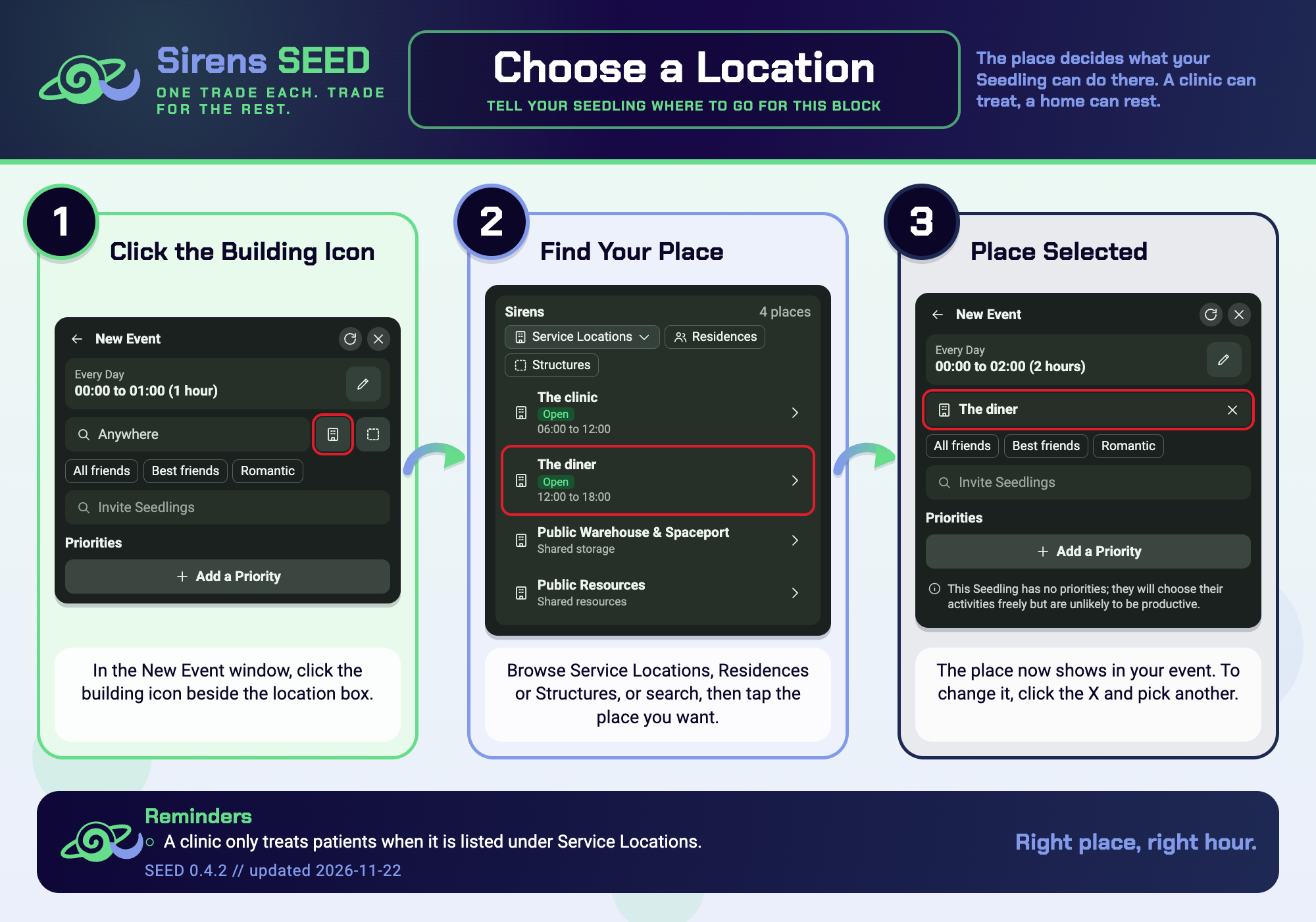
Choose a Location. Tell your Seedling where to go for this block

1Click the Building Icon

In the New Event window, click the building icon beside the location box.

2Find Your Place

Browse Service Locations, Residences or Structures, or search, then tap the place you want.

3Place Selected

The place now shows in your event. To change it, click the X and pick another.

Reminders

  • A clinic only treats patients when it is listed under Service Locations.

Right place, right hour.

SEED 0.4.2 // updated 2026-11-22

Tell your Seedling what to do once it gets there

Add Your Priorities

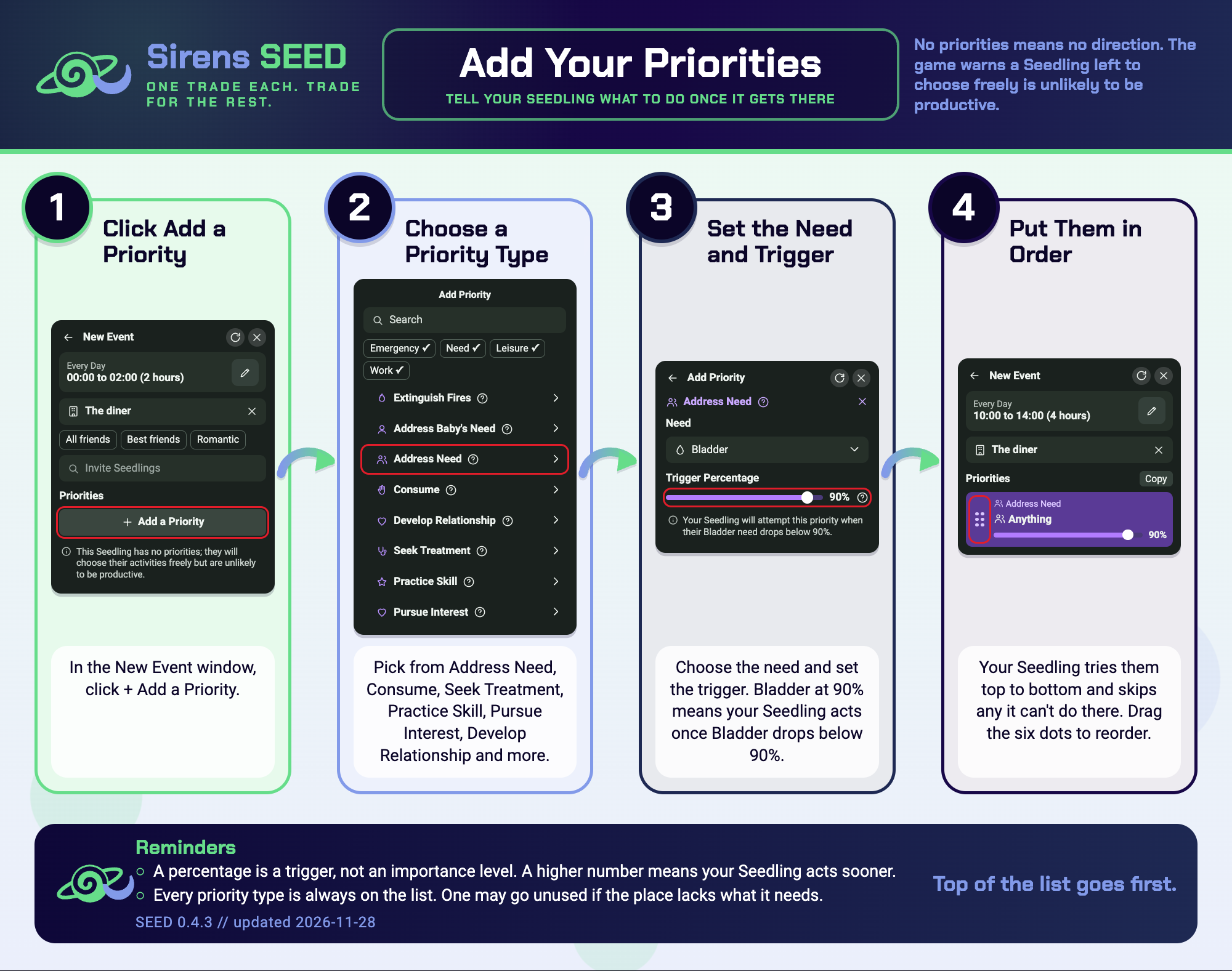
Add Your Priorities. Tell your Seedling what to do once it gets there

1Click Add a Priority

In the New Event window, click + Add a Priority.

2Choose a Priority Type

Pick from Address Need, Consume, Seek Treatment, Practice Skill, Pursue Interest, Develop Relationship and more.

3Set the Need and Trigger

Choose the need and set the trigger. Bladder at 90% means your Seedling acts once Bladder drops below 90%.

4Put Them in Order

Your Seedling tries them top to bottom and skips any it can't do there. Drag the six dots to reorder.

Reminders

  • A percentage is a trigger, not an importance level. A higher number means your Seedling acts sooner.
  • Every priority type is always on the list. One may go unused if the place lacks what it needs.

Top of the list goes first.

SEED 0.4.3 // updated 2026-11-28

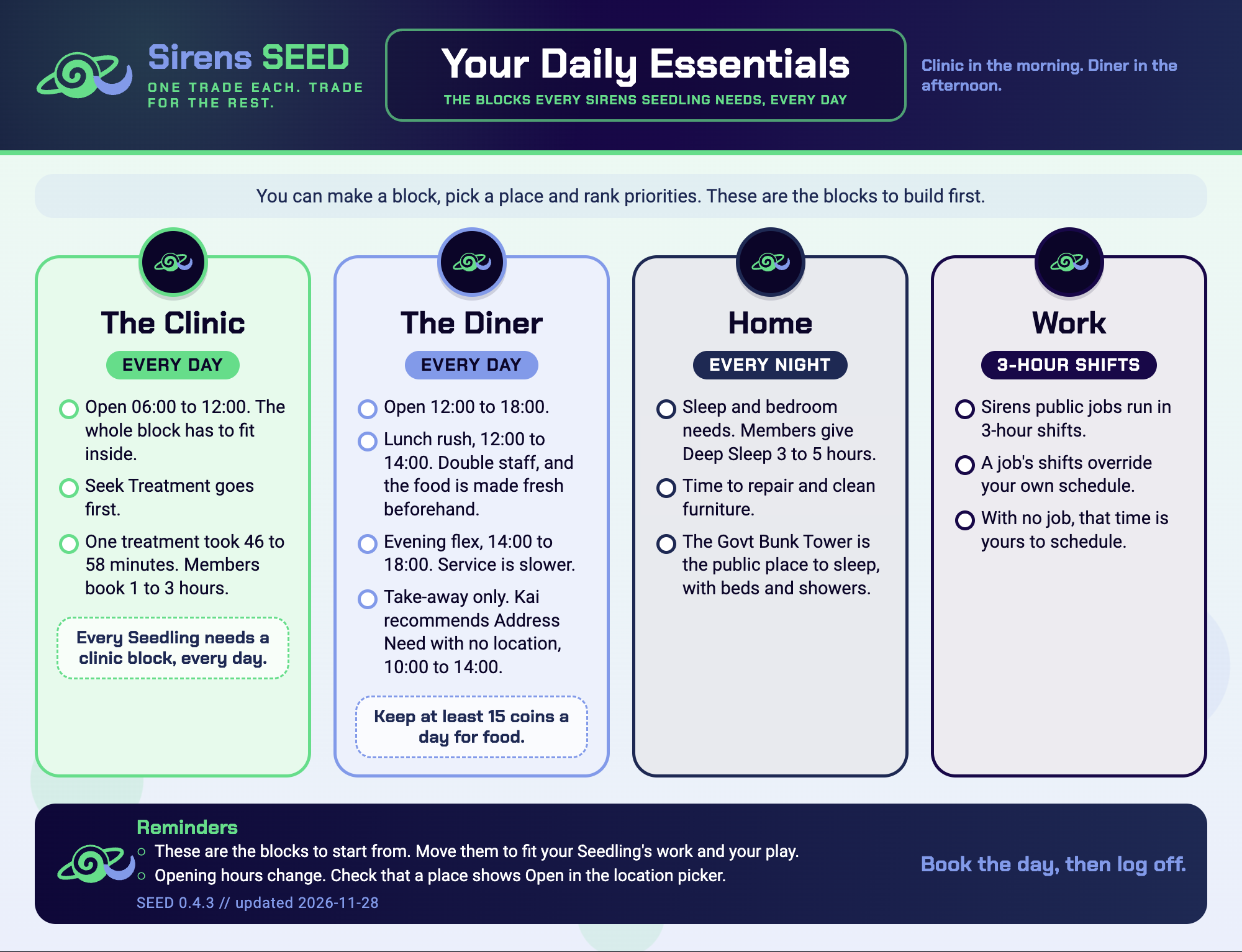
The blocks every Sirens Seedling needs, every day

Your Daily Essentials

Your Daily Essentials. The blocks every Sirens Seedling needs, every day

The Clinic

Every day

  • Open 06:00 to 12:00. The whole block has to fit inside.
  • Seek Treatment goes first.
  • One treatment took 46 to 58 minutes. Members book 1 to 3 hours.

Every Seedling needs a clinic block, every day.

The Diner

Every day

  • Open 12:00 to 18:00.
  • Lunch rush, 12:00 to 14:00. Double staff, and the food is made fresh beforehand.
  • Evening flex, 14:00 to 18:00. Service is slower.
  • Take-away only. Kai recommends Address Need with no location, 10:00 to 14:00.

Keep at least 15 coins a day for food.

Home

Every night

  • Sleep and bedroom needs. Members give Deep Sleep 3 to 5 hours.
  • Time to repair and clean furniture.
  • The Govt Bunk Tower is the public place to sleep, with beds and showers.

Work

3-hour shifts

  • Sirens public jobs run in 3-hour shifts.
  • A job's shifts override your own schedule.
  • With no job, that time is yours to schedule.

Reminders

  • These are the blocks to start from. Move them to fit your Seedling's work and your play.
  • Opening hours change. Check that a place shows Open in the location picker.

Book the day, then log off.

SEED 0.4.3 // updated 2026-11-28

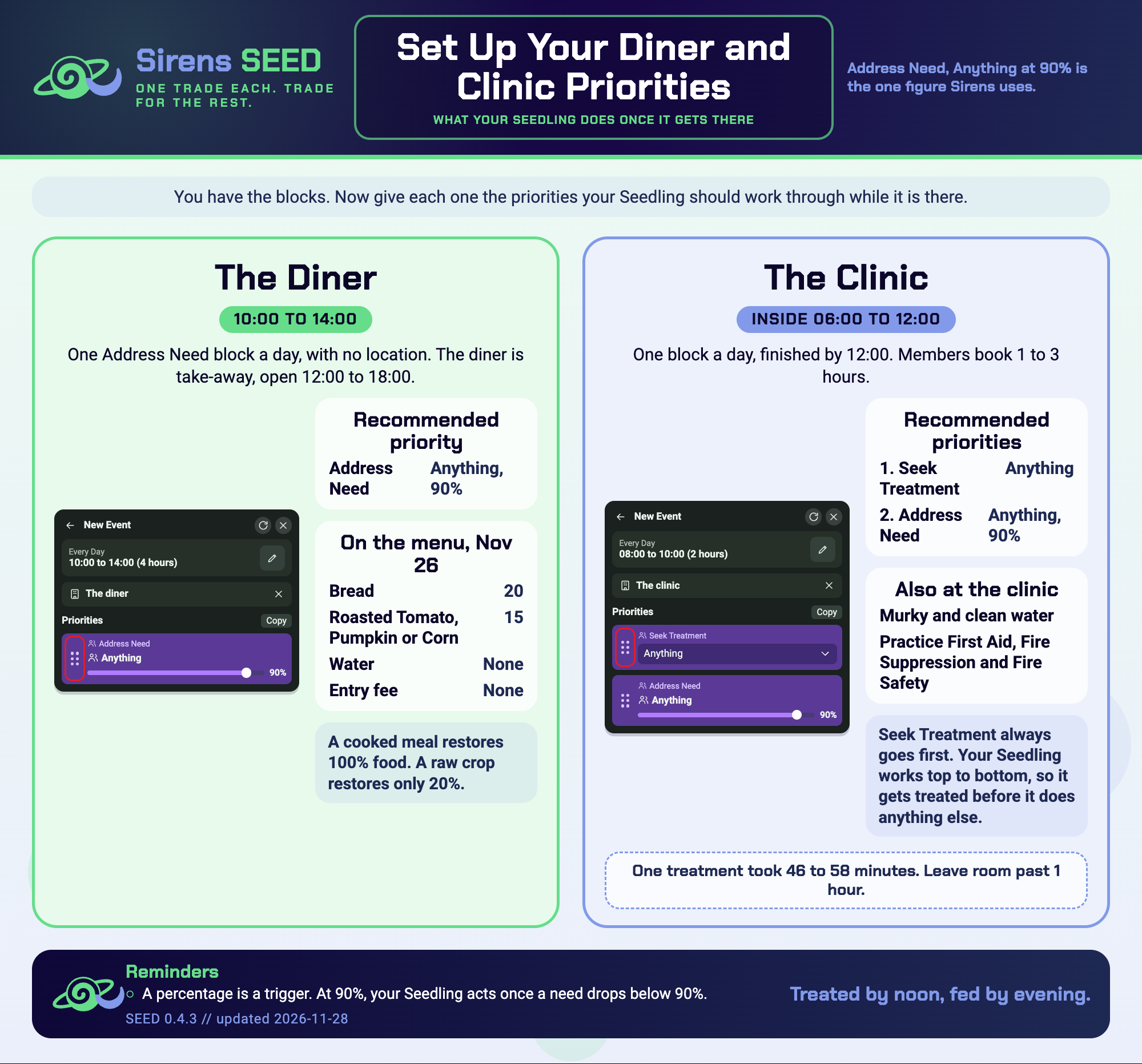
What your Seedling does once it gets there

Set Up Your Diner and Clinic Priorities

Set Up Your Diner and Clinic Priorities. What your Seedling does once it gets there

The Diner

10:00 to 14:00

One Address Need block a day, with no location. The diner is take-away, open 12:00 to 18:00.

Recommended priority

  • Address Need: Anything, 90%

On the menu, Nov 26

  • Bread: 20
  • Roasted Tomato, Pumpkin or Corn: 15
  • Water: None
  • Entry fee: None

A cooked meal restores 100% food. A raw crop restores only 20%.

The Clinic

Inside 06:00 to 12:00

One block a day, finished by 12:00. Members book 1 to 3 hours.

Recommended priorities

  • 1. Seek Treatment: Anything
  • 2. Address Need: Anything, 90%

Also at the clinic

  • Murky and clean water
  • Practice First Aid, Fire Suppression and Fire Safety

Seek Treatment always goes first. Your Seedling works top to bottom, so it gets treated before it does anything else.

Reminders

  • A percentage is a trigger. At 90%, your Seedling acts once a need drops below 90%.

Treated by noon, fed by evening.

SEED 0.4.3 // updated 2026-11-28

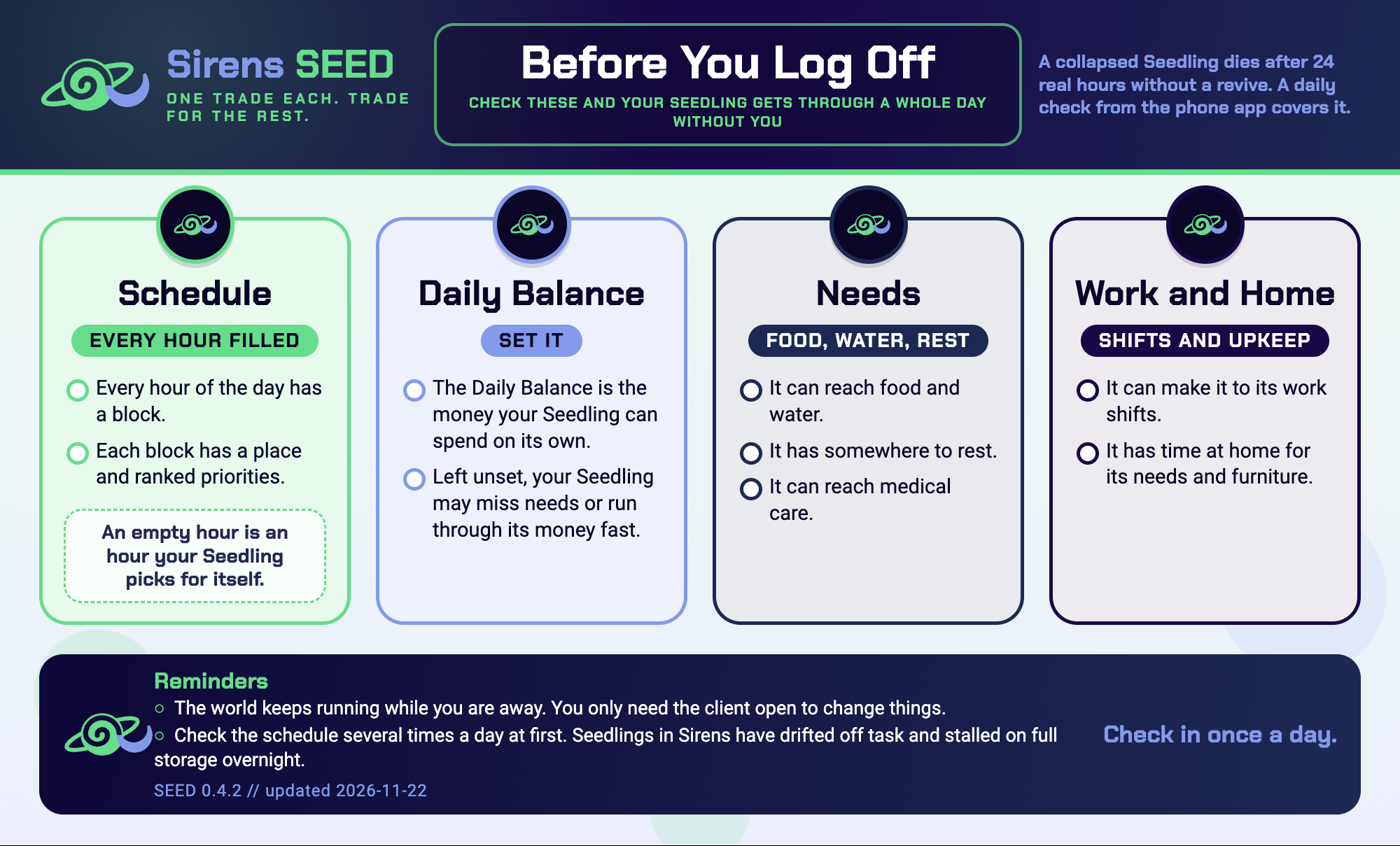
Check these and your Seedling gets through a whole day without you

Before You Log Off

Before You Log Off. Check these and your Seedling gets through a whole day without you

Schedule

Every hour filled

  • Every hour of the day has a block.
  • Each block has a place and ranked priorities.

An empty hour is an hour your Seedling picks for itself.

Daily Balance

Set it

  • The Daily Balance is the money your Seedling can spend on its own.
  • Left unset, your Seedling may miss needs or run through its money fast.

Needs

Food, water, rest

  • It can reach food and water.
  • It has somewhere to rest.
  • It can reach medical care.

Work and Home

Shifts and upkeep

  • It can make it to its work shifts.
  • It has time at home for its needs and furniture.

Reminders

  • The world keeps running while you are away. You only need the client open to change things.
  • Check the schedule several times a day at first. Seedlings in Sirens have drifted off task and stalled on full storage overnight.

Check in once a day.

SEED 0.4.2 // updated 2026-11-22

Playing a Seedling

The companion app

Free on iPhone, iPad, and Android, from Klang Games. It needs the PC or Mac game to be useful, since it is a companion and not a standalone game. It works on Android phones, even though the SEED website tells mobile visitors to play on PC.

As of

Get it
App Store (iOS or iPadOS 15 or later) or Google Play. Search for "Seed Game" on the App Store or "Seed Companion" on Google Play.
Sign in
Scan the QR code from the desktop game.
Android is rougher than iOS

Android users report crashes in World View, lag, and chat that sometimes fails. A version mismatch with the game can also break the app, so keep the app and the desktop client both updated.

Playing a Seedling

When a Seedling dies

If you run two Seedlings and one dies, the other keeps going. It does not inherit from the one that died unless it is that Seedling's child.

As of

Time runs fast
One in-game day is one real hour, so a year passes every real day. The game calls a day a tau.
How Seedlings die
After 24 real hours collapsed without a revive, or of old age at about 120 years, which is about 120 real days. Seedlings cannot be deleted.
Property
Goes to the Seedling's children. With no heir, it goes to the society for redistribution. Owning both Seedlings does not make one the other's heir.
Slot and Life
A Seedling Life is spent when you spawn a Seedling. A Platinum Slot is permanent and stays. A timed slot that has already expired disappears when its Seedling dies, so you need a new slot to spawn again.

Life in Sirens

Working from home

Each of us picks a specialty and works it from home, instead of everyone crafting everything. Each home keeps its own stock and lists it from its outbox on local-only orders, so anyone in the society can buy what they need.

As of

  1. Pick a specialtySet your home up for one line of work, such as farming, wood processing, or tailoring, and get good at it. Leave the rest to the people who specialize in it.
  2. Set your home's inboxA new Building Inbox accepts nothing. Open its settings and allow the inputs your specialty uses, or deliveries stall.
  3. Keep your stock at homeMaterials for your specialty, and what you make, live in your home's containers.
  4. Trade through the marketSell what you make from your outbox with local-only orders, and Auto-Restock what you use. See Trading inside Sirens.
  5. Offer services, not only goodsSome specialties are services. Healing is one: injured Seedlings come to your clinic for treatment instead of being handed a bandage. See Healing.
One industry per player
Members split industries among themselves, such as carpentry, or metals and processing. With only two Seedlings, pick one industry rather than running two large facilities.
Chain skills
A chemist Seedling can center on chemistry processing and tailoring, with water treatment, water harvesting, mushroom gathering, and coal and stone harvesting as chain skills. Many chemistry recipes use mushrooms.

Life in Sirens

Trading in and out of Sirens

Members sell to each other and, through the Sirens spaceport, to other societies. Members buy on the global market too. Auto-Restock is the one tool that buys only inside the society.

As of

Sell

From your outbox

  • Auto-Sell asks where to sell. Sirens (here) keeps the order inside the society. All Societies lists it on the global market.
  • Price floor is 1 SeedCoin. A price of 0 is refused.
  • A sell order has your Seedlings haul the goods into your outbox. Buyers draw from there.
  • Auto-Sell keeps one order listed and relists from outbox stock when it sells out.
  • Set production to "do until X in storage" so stock stops at X.
Buy

With Auto-Restock

  • Properties, your building, Marketplace tab, Auto-Restock, Set Up Auto-Restock.
  • Set target stock, max price per unit, and the wallet to pay from.
  • It buys several times per tau, only inside the society.
  • For a one-off, use New Order, Buy. Self Pickup needs a Seedling free to haul.
  • Buying from other societies goes through the spaceport.
Every buy needs SeedCoin in the paying wallet

Even a 1-coin order reserves money up front, and unused coin goes back to the wallet. A new business wallet starts at 0. Your inbox also accepts nothing until you allow the item.

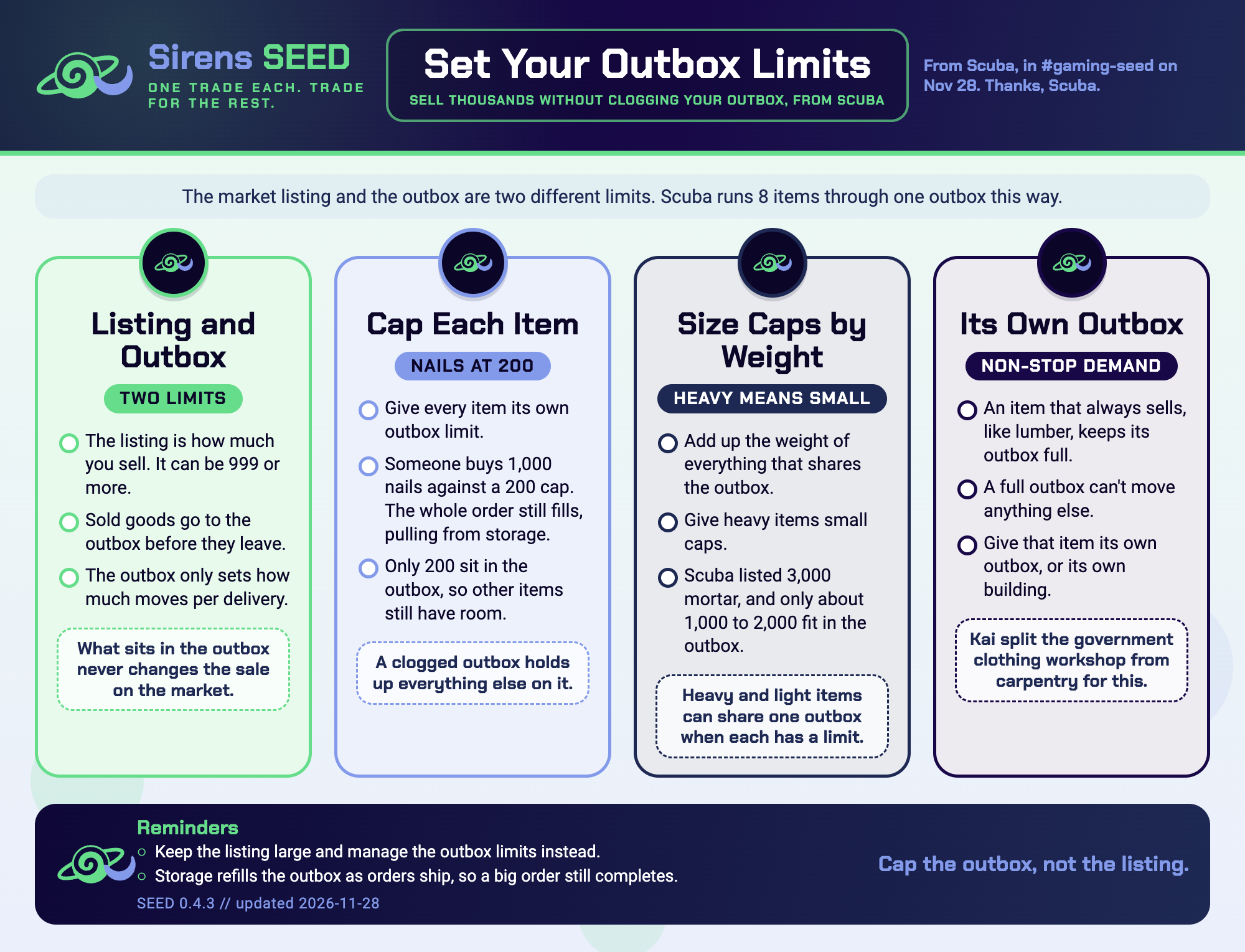
Sell thousands without clogging your outbox, from Scuba

Set Your Outbox Limits

Set Your Outbox Limits. Sell thousands without clogging your outbox, from Scuba

Listing and Outbox

Two limits

  • The listing is how much you sell. It can be 999 or more.
  • Sold goods go to the outbox before they leave.
  • The outbox only sets how much moves per delivery.

What sits in the outbox never changes the sale on the market.

Cap Each Item

Nails at 200

  • Give every item its own outbox limit.
  • Someone buys 1,000 nails against a 200 cap. The whole order still fills, pulling from storage.
  • Only 200 sit in the outbox, so other items still have room.

A clogged outbox holds up everything else on it.

Size Caps by Weight

Heavy means small

  • Add up the weight of everything that shares the outbox.
  • Give heavy items small caps.
  • Scuba listed 3,000 mortar, and only about 1,000 to 2,000 fit in the outbox.

Heavy and light items can share one outbox when each has a limit.

Its Own Outbox

Non-stop demand

  • An item that always sells, like lumber, keeps its outbox full.
  • A full outbox can't move anything else.
  • Give that item its own outbox, or its own building.

Kai split the government clothing workshop from carpentry for this.

Reminders

  • Keep the listing large and manage the outbox limits instead.
  • Storage refills the outbox as orders ship, so a big order still completes.

Cap the outbox, not the listing.

SEED 0.4.3 // updated 2026-11-28

Life in Sirens

Healing

Healing is a service. A clinic advertises a Heal service for each condition and treats Seedlings with remedies from its own stock. Patients get there through their own schedule: every member books a daily clinic block with Seek Treatment first. The clinic has to be listed under Service Locations, and the block has to fall inside its medic's hours (see Clinic hours).

As of

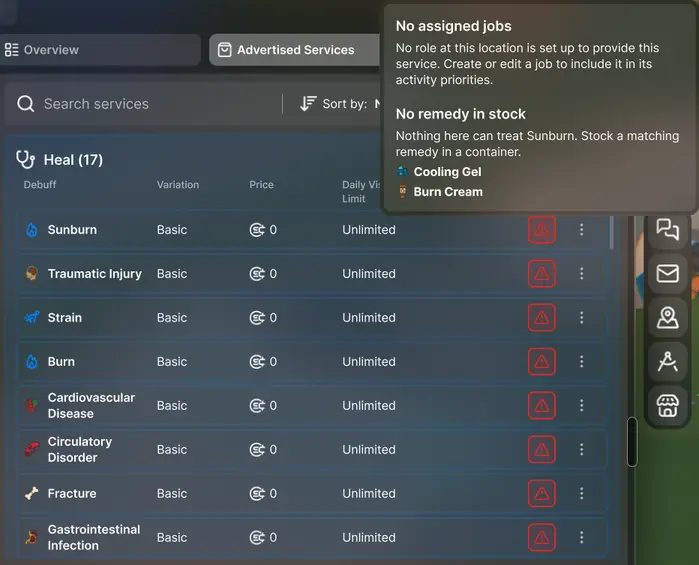
Advertised Services, Heal list: Sunburn, Traumatic Injury, Strain, Burn, Cardiovascular Disease, Circulatory Disorder, Fracture, Gastrointestinal Infection, each Basic, price 0, unlimited daily visitors, with red warnings: No assigned jobs, and No remedy in stock, which lists Cooling Gel and Burn Cream for Sunburn
Business, Services, Advertised Services. Each red icon marks something missing. Hover it to see what. Taken , SEED 0.4.2.
  1. Set up HealBusiness, then Services, then Advertised Services. Heal covers 17 conditions, and the price can stay at 0.
  2. Stock the remediesEach condition needs its remedy in a container at the clinic. Hover a row's red icon to see which one. Sunburn takes Cooling Gel or Burn Cream. Traumatic injury uses several remedies, including a Splint and a Penlight.
  3. Assign the jobA role under Employment has to include the service in its activity priorities, or nobody treats patients.

Joining Sirens

Join the society

As of

  1. Get SEED and make sure you can play. The Starter Pack covers one Seedling.
  2. We have not set an opening date. Watch the Sirens Discord for the opening.
  3. Before you commit, look around. In the game, open World View, find Sirens, and press Visit.
  4. Join with a new Seedling, or bring one you already have with a Migration Ticket.
  5. Set your Seedling's schedule and Daily Balance before you log off. Before you log off walks through it.
The Starter Pack

The one-time Starter Pack is enough to play. It covers the PC and Mac client and one Seedling. The mobile companion app is free. Your Seedling stays with you until it dies, so pick traits deliberately.

The invite is a code

Paste the SEED invite into the in-game "enter a code to join" field. Do not open it in a browser.