Sirens is not taking new members yet. We open once the food supply is steady. Until then, this guide is for you too.
As of
Sirens is a society on SEED, Klang Games' society-sim MMO, settled on Arenosa island. Each of us picks one line of work, such as farming, metalwork, lumber, baking, or medicine, and we trade with each other for the rest. Anyone who gets hurt can go to our clinic for treatment. The society also grew out of the Sirens Discord community, which plays other games together too.
Sirens fits you if you want to take on one job and get good at it, and you would rather trade with neighbors than do everything yourself. It also fits if you play in short sessions around work, kids, or sleep. Your Seedling keeps working on its schedule while you are away.
As of
What it costs
SEED is in early access and the Starter Pack is $29.99 (about 35 GBP in the UK). If your Seedling collapses and nobody revives it within 24 real hours, it dies. A daily check from the free phone app covers that, and the player guide shows how to set a schedule that gets your Seedling through a whole day without you.
Where Sirens stands
As of
Tier
Town I.
Size
About 27 Seedlings, with more open jobs than people.
Laws
A Minimum Wage law. A Business Tax of 1% a day on a business balance above 25,000. A High Balance Tax of 100 a day on a Seedling holding more than 10,000.
Can I join yet
Not yet. Sirens is private and has no opening date. The plan is to open once food and water stay stable for about 12 hours. A plot can be claimable while Sirens is still invite-only. How a plot becomes claimable.
Join the society
As of
Get SEED and make sure you can play. The Starter Pack covers one Seedling.
We have not set an opening date. Watch the Sirens Discord for the opening.
Before you commit, look around. In the game, open World View, find Sirens, and press Visit.
Join with a new Seedling, or bring one you already have with a Migration Ticket.
Set your Seedling's schedule and Daily Balance before you log off. Before you log off walks through it.
The Starter Pack
The one-time Starter Pack is enough to play. It covers the PC and Mac client and one Seedling. The mobile companion app is free. Your Seedling stays with you until it dies, so pick traits deliberately.
The invite is a code
Paste the SEED invite into the in-game "enter a code to join" field. Do not open it in a browser.
Part 2
The guide in pictures
Each topic as one picture, with the steps in the game's own windows. Tap a picture to open it full size.
Give your Seedling a time and a place to be, every day
Read it as text
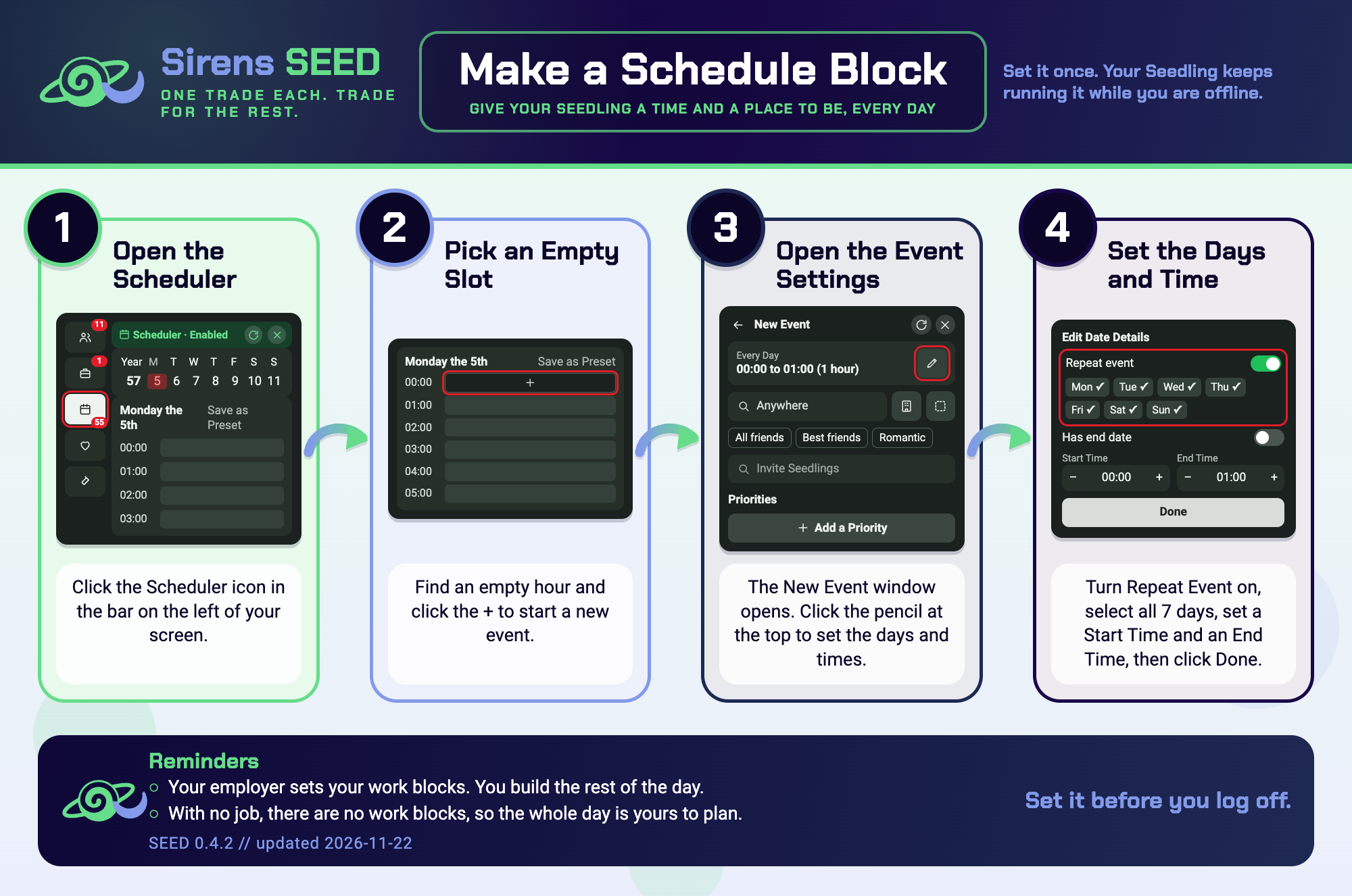
Open the SchedulerClick the Scheduler icon in the bar on the left of your screen.
Pick an Empty SlotFind an empty hour and click the + to start a new event.
Open the Event SettingsThe New Event window opens. Click the pencil at the top to set the days and times.
Set the Days and TimeTurn Repeat Event on, select all 7 days, set a Start Time and an End Time, then click Done.
Your employer sets your work blocks. You build the rest of the day.
With no job, there are no work blocks, so the whole day is yours to plan.
Choose a Location
Tell your Seedling where to go for this block
Read it as text
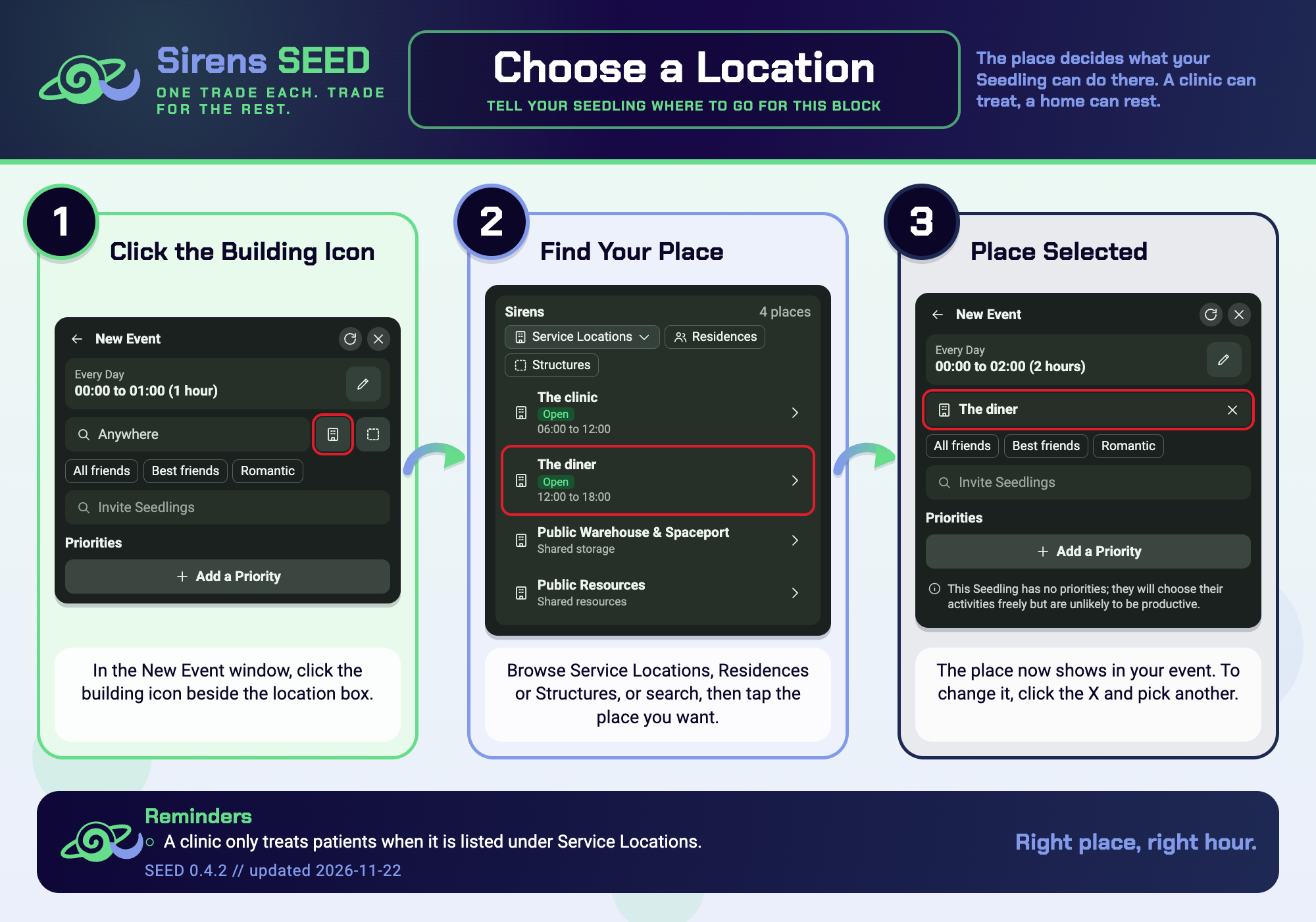
Click the Building IconIn the New Event window, click the building icon beside the location box.
Find Your PlaceBrowse Service Locations, Residences or Structures, or search, then tap the place you want.
Place SelectedThe place now shows in your event. To change it, click the X and pick another.
A clinic only treats patients when it is listed under Service Locations.
Add Your Priorities
Tell your Seedling what to do once it gets there
Read it as text
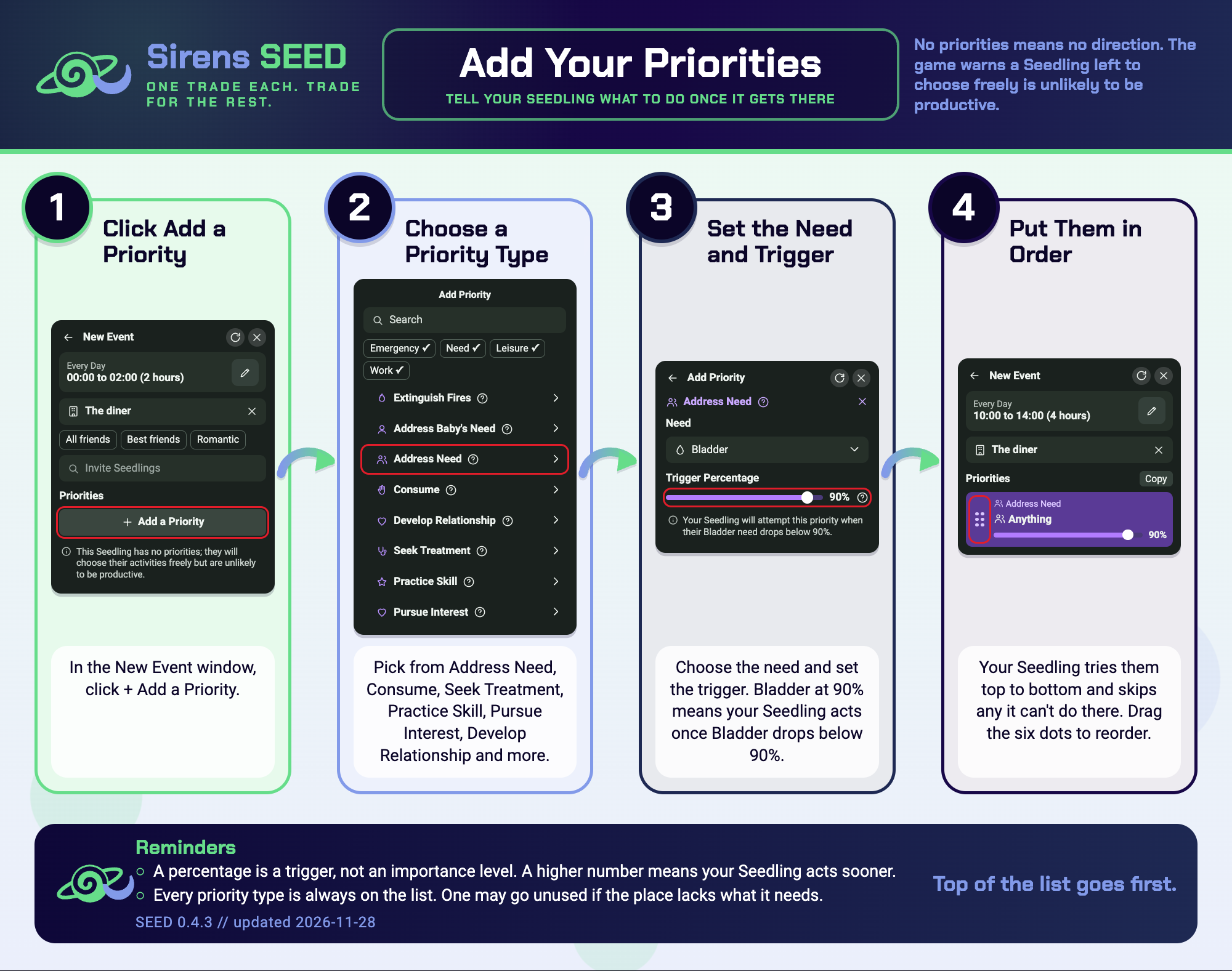
Click Add a PriorityIn the New Event window, click + Add a Priority.
Choose a Priority TypePick from Address Need, Consume, Seek Treatment, Practice Skill, Pursue Interest, Develop Relationship and more.
Set the Need and TriggerChoose the need and set the trigger. Bladder at 90% means your Seedling acts once Bladder drops below 90%.
Put Them in OrderYour Seedling tries them top to bottom and skips any it can't do there. Drag the six dots to reorder.
A percentage is a trigger, not an importance level. A higher number means your Seedling acts sooner.
Every priority type is always on the list. One may go unused if the place lacks what it needs.
Before You Log Off
Check these and your Seedling gets through a whole day without you
Read it as text
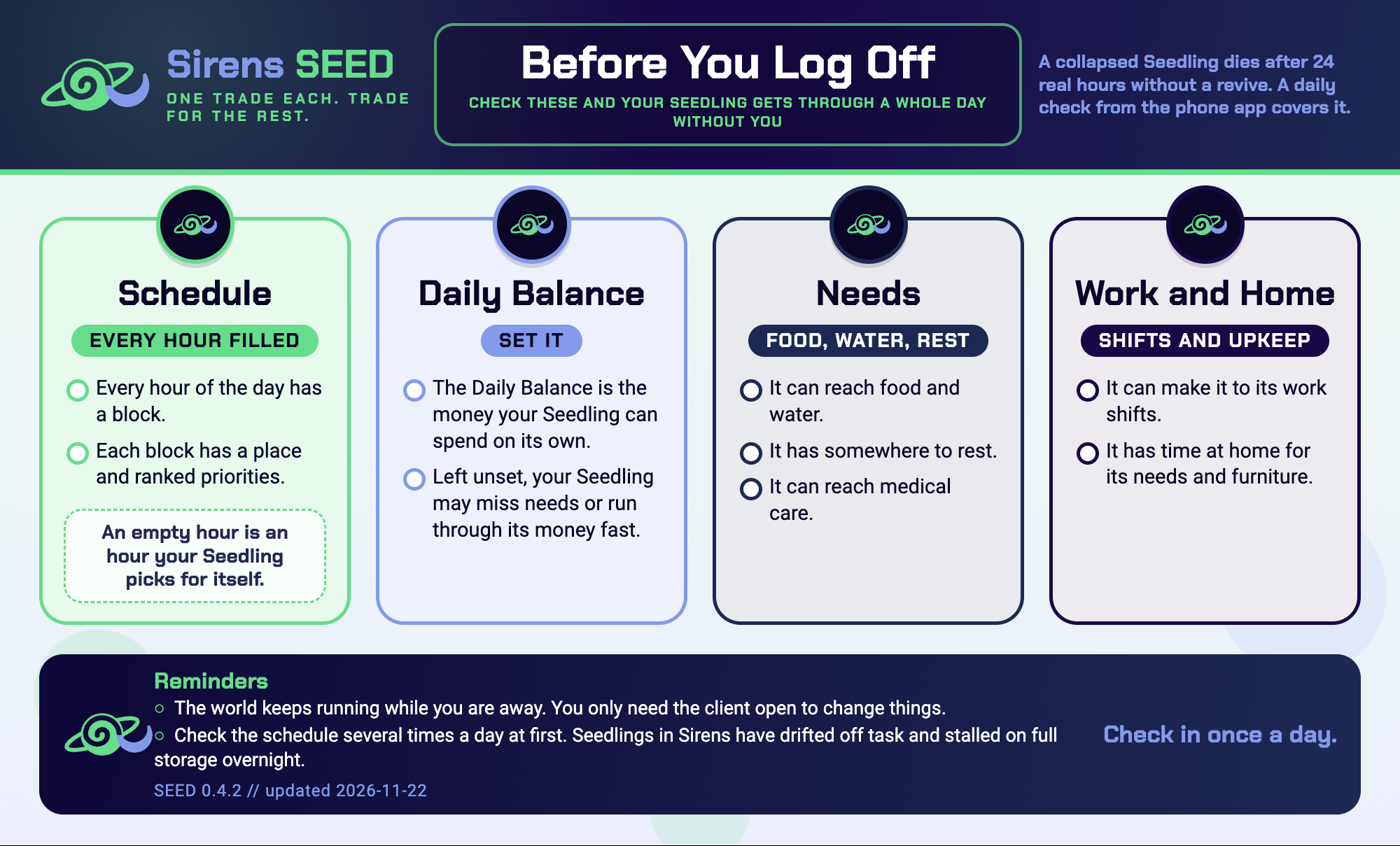
Every hour filled
Schedule
Every hour of the day has a block.
Each block has a place and ranked priorities.
An empty hour is an hour your Seedling picks for itself.
Set it
Daily Balance
The Daily Balance is the money your Seedling can spend on its own.
Left unset, your Seedling may miss needs or run through its money fast.
Food, water, rest
Needs
It can reach food and water.
It has somewhere to rest.
It can reach medical care.
Shifts and upkeep
Work and Home
It can make it to its work shifts.
It has time at home for its needs and furniture.
The world keeps running while you are away. You only need the client open to change things.
Check the schedule several times a day at first. Seedlings in Sirens have drifted off task and stalled on full storage overnight.
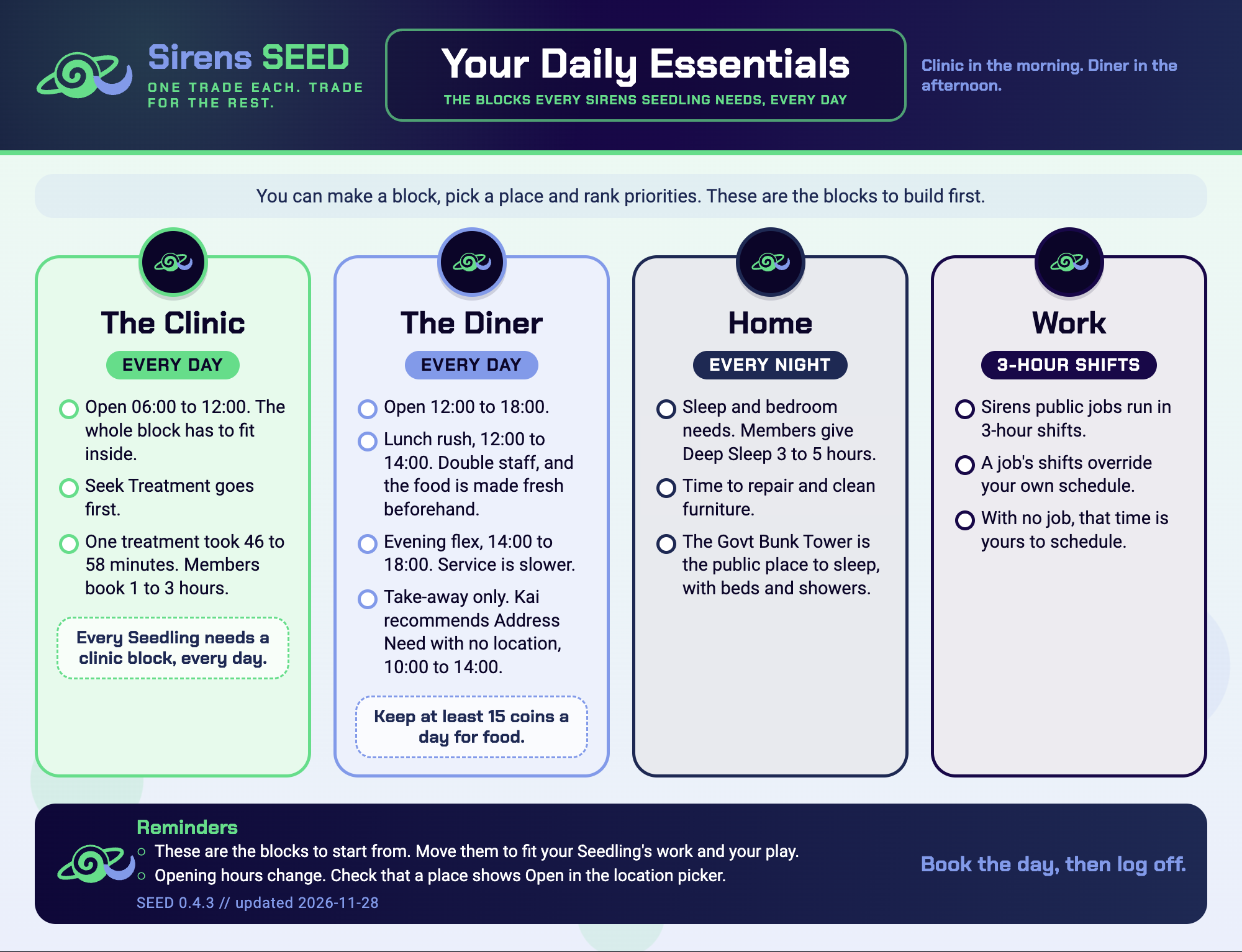
Your Daily Essentials
The blocks every Sirens Seedling needs, every day
Read it as text
Every day
The Clinic
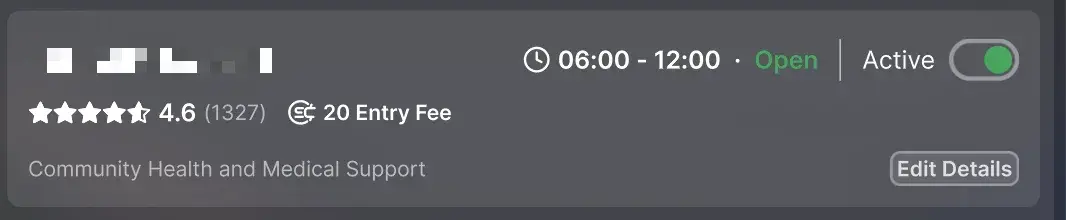
Open 06:00 to 12:00. The whole block has to fit inside.
Seek Treatment goes first.
One treatment took 46 to 58 minutes. Members book 1 to 3 hours.
Every Seedling needs a clinic block, every day.
Every day
The Diner
Open 12:00 to 18:00.
Lunch rush, 12:00 to 14:00. Double staff, and the food is made fresh beforehand.
Evening flex, 14:00 to 18:00. Service is slower.
Take-away only. Kai recommends Address Need with no location, 10:00 to 14:00.
Keep at least 15 coins a day for food.
Every night
Home
Sleep and bedroom needs. Members give Deep Sleep 3 to 5 hours.
Time to repair and clean furniture.
The Govt Bunk Tower is the public place to sleep, with beds and showers.
3-hour shifts
Work
Sirens public jobs run in 3-hour shifts.
A job's shifts override your own schedule.
With no job, that time is yours to schedule.
These are the blocks to start from. Move them to fit your Seedling's work and your play.
Opening hours change. Check that a place shows Open in the location picker.
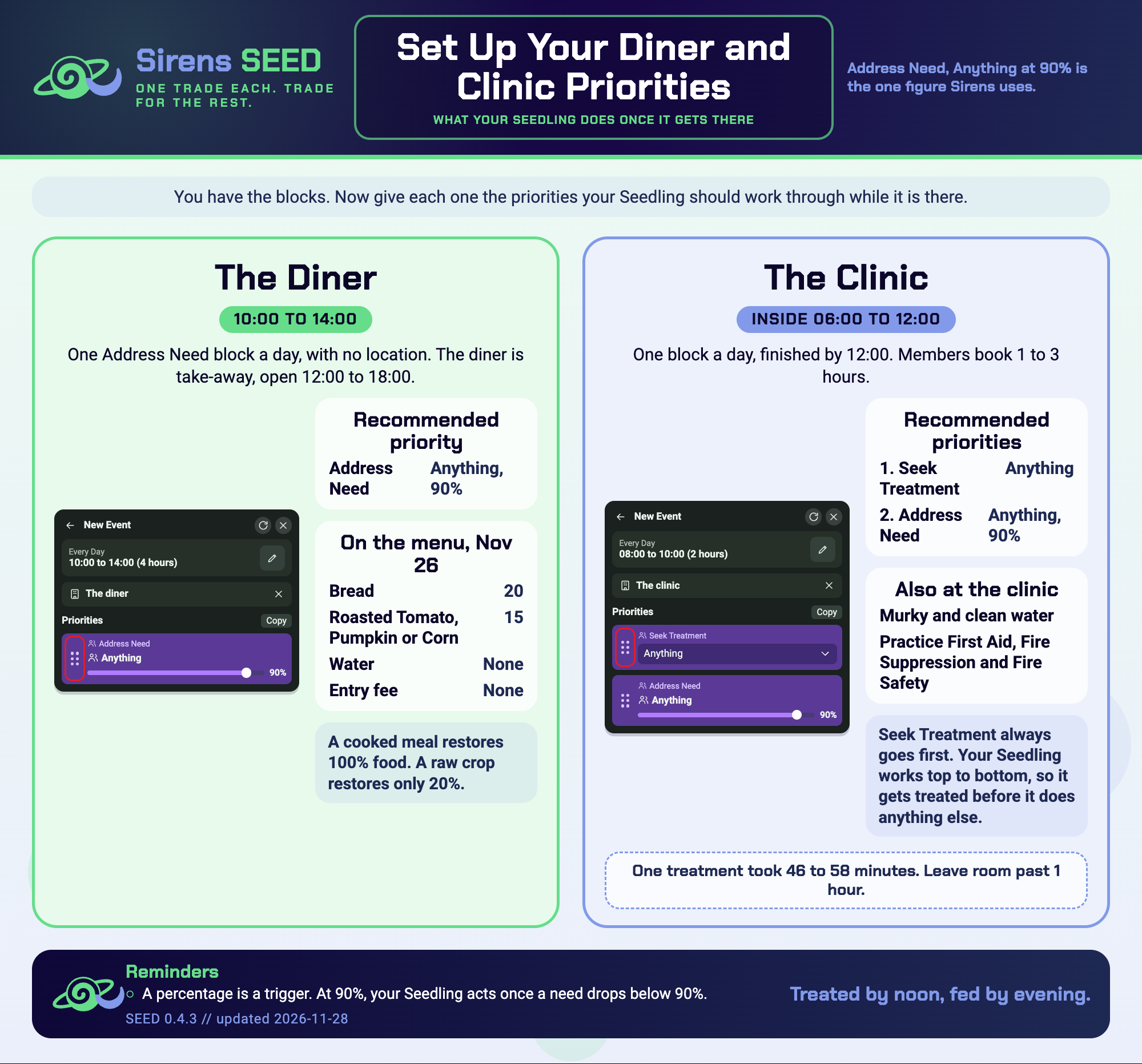
Set Up Your Diner and Clinic Priorities
What your Seedling does once it gets there
Read it as text
10:00 to 14:00
The Diner
One Address Need block a day, with no location. The diner is take-away, open 12:00 to 18:00.
Recommended priority
Address Need: Anything, 90%
On the menu, Nov 26
Bread: 20
Roasted Tomato, Pumpkin or Corn: 15
Water: None
Entry fee: None
A cooked meal restores 100% food. A raw crop restores only 20%.
Inside 06:00 to 12:00
The Clinic
One block a day, finished by 12:00. Members book 1 to 3 hours.
Recommended priorities
1. Seek Treatment: Anything
2. Address Need: Anything, 90%
Also at the clinic
Murky and clean water
Practice First Aid, Fire Suppression and Fire Safety
Seek Treatment always goes first. Your Seedling works top to bottom, so it gets treated before it does anything else.
A percentage is a trigger. At 90%, your Seedling acts once a need drops below 90%.
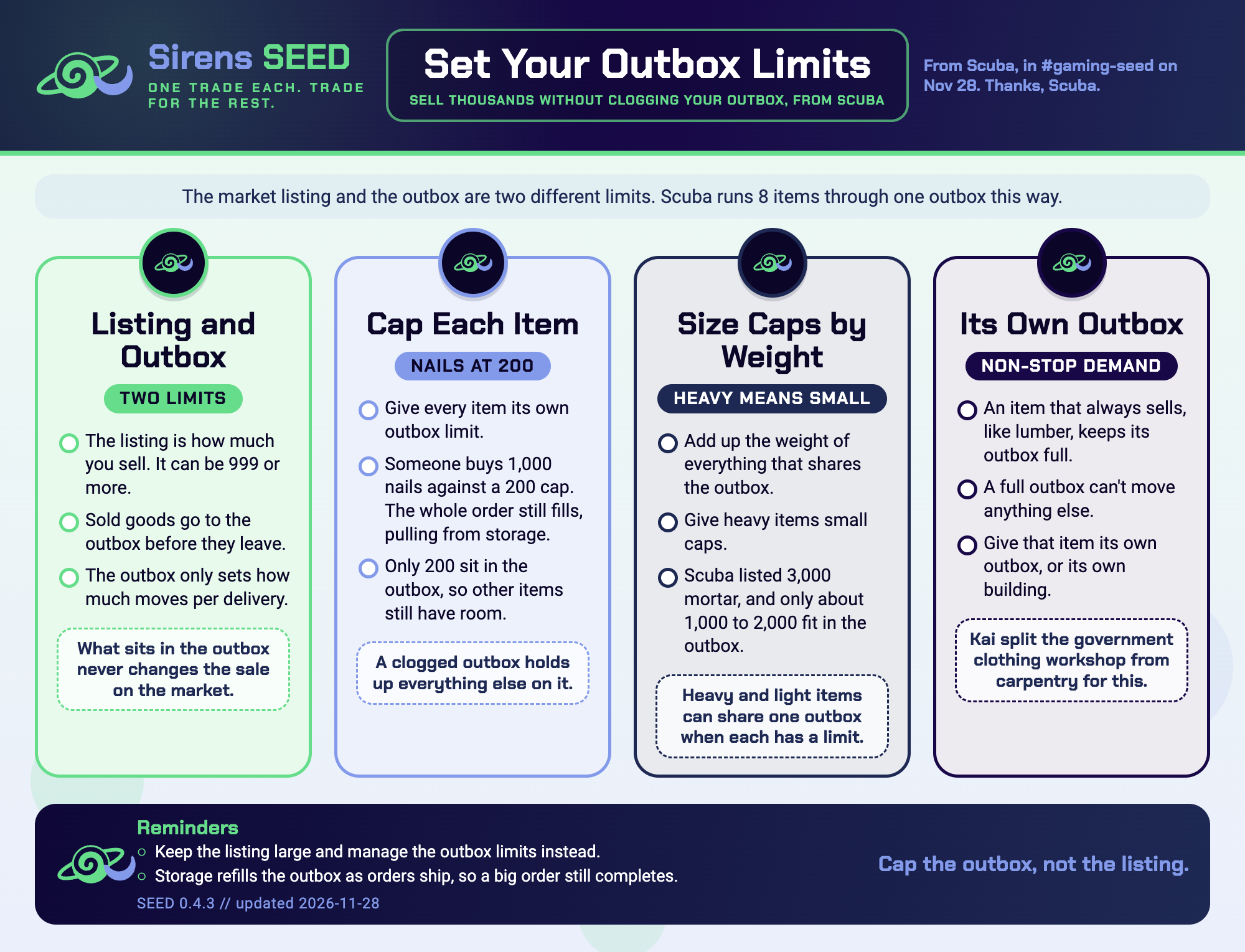
Set Your Outbox Limits
Sell thousands without clogging your outbox, from Scuba
Read it as text
Two limits
Listing and Outbox
The listing is how much you sell. It can be 999 or more.
Sold goods go to the outbox before they leave.
The outbox only sets how much moves per delivery.
What sits in the outbox never changes the sale on the market.
Nails at 200
Cap Each Item
Give every item its own outbox limit.
Someone buys 1,000 nails against a 200 cap. The whole order still fills, pulling from storage.
Only 200 sit in the outbox, so other items still have room.
A clogged outbox holds up everything else on it.
Heavy means small
Size Caps by Weight
Add up the weight of everything that shares the outbox.
Give heavy items small caps.
Scuba listed 3,000 mortar, and only about 1,000 to 2,000 fit in the outbox.
Heavy and light items can share one outbox when each has a limit.
Non-stop demand
Its Own Outbox
An item that always sells, like lumber, keeps its outbox full.
A full outbox can't move anything else.
Give that item its own outbox, or its own building.
Kai split the government clothing workshop from carpentry for this.
Keep the listing large and manage the outbox limits instead.
Storage refills the outbox as orders ship, so a big order still completes.
Part 3
Playing a Seedling
What keeps a Seedling alive while you are away, how a schedule works, and the rules you meet as you play.
Before you log off
As of
A collapsed Seedling dies after 24 real hours
Starvation, dehydration, illness, or injury make a Seedling collapse. If nobody revives it within 24 real hours, it dies.
The world keeps running
Your Seedling follows its schedule while you are offline. You only need the client open to change things.
Set a Daily Balance
The Daily Balance is the money your Seedling can spend on its own. Leave it unset and your Seedling may miss needs or run through its money fast.
Check before you log off
The schedule is filled in and the Daily Balance is set. Your Seedling can get food and water, has somewhere to rest, can reach medical care, can make its work shifts, and has time at home for its needs and furniture. It should get through a whole day without you.
Can I play mostly AFK?
Yes, once the schedule is set up. Seedlings run whatever schedule you give them, for days if it is good, and jobs added to tables get done. The first sessions are hands-on, though.
As of
No priorities, no direction
A Seedling with no priorities chooses freely, and the game warns it is unlikely to be productive. A schedule is timed blocks, each with a place and a ranked list of priorities.
Early game is the active part
You build the first schedule, mark resources, and place tents and crafted items by hand.
Look in often at first
Unwatched Seedlings drift off task, stall on jammed storage, and can fill every storage with ore overnight. A tired Seedling stops working while its queue keeps cycling. Check the schedule several times a day at first.
The one hard limit
A collapsed Seedling dies after 24 real hours without a revive. Before you log off covers it.
Build a schedule block
Each block answers two questions: where your Seedling goes, and what it does there. Your employer sets work blocks, so you only build the rest of the day. Adapted from a SEED community member's guide.
As of
Make a blockClick the Scheduler icon on the left, click + on an empty slot, then the pencil icon. Turn on Repeat Event, select all 7 days, set the start and end time, and click Done.
Pick the placeClick the building icon beside the location box and browse Service Locations, Residences, or Structures. The place decides what your Seedling can do there.
Rank the prioritiesClick Add a Priority. Options include Address Need, Consume, Seek Treatment, Practice Skill, Pursue Interest, and Develop Relationship. Your Seedling tries them top to bottom and skips any it can't do there. Drag the six-dot handle to reorder.
A percentage is a trigger
Bladder at 90% means your Seedling acts once Bladder drops below 90%. A higher number means it acts sooner. It is not an importance level.
Priorities that work
Make the first priority specific, such as Produce Murky Water (1000ml), not a general one. Then add what your Seedling should fall back on when the first task is blocked.
As of
What you can pick
Add a Priority filters by Emergency, Need, Leisure and Work. Task types include Build, Clean, Client Deliveries, Farm, Harvest, Produce, Address Need, Repair, Haul, Run Machine and Study. Other cards include Extinguish Fires, Heal (Anything), Repair (Anything, with a percent slider), and Practice Skill, such as First Aid.
Copy a list
Priorities in a block can be copied and pasted between schedules.
Eating and drinking
Food and water are automatic. A Seedling stops work on its own to drink murky water or eat mushrooms when it needs to.
Building
Make Build the first priority. Mark the building inbox as high-priority storage so materials do not go elsewhere.
Hauling
Make sure a hauling job exists. Once a transfer order exists and hauling is somewhere on the schedule, the transfer happens on its own. You do not move items by hand.
Wild harvests need a zone
To harvest wild items such as mushrooms, mark a harvest zone. A priority set to Anywhere works only on marked targets. Scheduling zones have a maximum size.
Picking is not hauling
Picked mushrooms can sit in the field. Once plenty are on the ground, switch a Seedling from gathering to hauling.
Produce is not Harvest
Hydroponics tables use Produce. Ground farms use Harvest.
Give the block a place
If a task needs a certain place, such as an oven for baking, set the block's location. Seedlings that shower outside despite having a bathroom need a location on their Attend Need - Hygiene priority.
Service Locations
These are for services such as a clinic, library or restaurant. A plain seller does not need one.
Buildings, not properties
Set an invited event at a building. At a property it shows "You do not have access to this location".
When a Seedling stalls
When a block is not working, read what the game says about it. Experienced members redo their schedules several times a day, because without the schedule nothing happens.
As of
Hover the block
A status popup shows what your Seedling is doing, such as taking a walk, or sulking from boredom because the bench for its Produce priority is set up for something else.
Read the activity tooltip
It lists each priority with the reason it is blocked, such as Farm, no access to Farming Field, or Haul, stone pile has nowhere to store stone. It is the most useful debugging tool, and it shows on mobile too.
Watch the default task
A general work block defaults to one task, so one resource can pile up while another barely moves.
Pause
Pause for this block, until work, for the rest of the tau, or until log off.
Rush one task
Clear everything but self-care and schedule only that task. Save the normal schedule as a preset, and the rush schedule as a second one.
The daily essentials
Every Seedling needs a clinic block and a food block every day. Hours are the ones the clinic and the diner keep in Sirens. Block lengths are what members use, since none is settled.
As of
Every day, inside 06:00 to 12:00
Clinic
#1 Seek Treatment, Anything. Always first.
#2 Address Need, Anything, 90%
The whole block must fall inside the clinic's hours, 06:00 to 12:00. One treatment can take 46 to 58 minutes, so book 1 to 3 hours.
Every day, 10:00 to 14:00
Diner
#1 Address Need, Anything, 90%
The diner is take-away, because Seedlings scheduled at the diner were not served. Set one Address Need block from 10:00 to 14:00 with no location to catch the lunch rush. The diner is open 12:00 to 18:00, with no entry fee and no water. A meal costs 15 to 20.
Every night
Home or Govt Bunk Tower
Sleep and bedroom needs. Give Deep Sleep 3 to 5 hours. Leave time at home to repair and clean furniture. The Govt Bunk Tower is the public place to sleep, with beds and showers.
If your Seedling has a job
Work
Sirens public jobs run in 3-hour shifts, and a job's shifts override your own schedule. The employer sets work hours and priorities. With no job, that time is yours to schedule.
With only 2 hours downtown, your Seedling arrives later than most and can find the food gone.
Some members send every Seedling to the clinic first thing each morning, because they get injured so often.
Schedules members use
Copy one of these and tune it. They are schedules members run, not rules. Keep every clinic block inside 06:00 to 12:00.
As of
How a schedule is laid out
Each Seedling has a daily schedule of named blocks. Each block has a category color and a location, which defaults to Anywhere. You can save a schedule as a preset.
A model day
00:00 to 03:00 bedroom needs. 03:00 to 06:00 shift 1. 06:00 to 09:00 shift 2. 09:00 to 14:00 needs (health, water, food). 14:00 to 17:00 shift 3. 17:00 to 20:00 shift 4. 20:00 to 24:00 living needs.
An away schedule
For a Seedling left alone, two Address Need blocks with no location, 20:00 to 04:00 overnight and 10:00 to 14:00 at lunch.
Rest is its own priority
To refill the Rest meter, schedule Rest itself. Address Need set to any need only fills energy.
Bonding time
Bonding windows are when Seedlings make friends and romantic partners. Three separate 1-hour relationship blocks caused constant dance parties that interrupted work.
Sharing beds
Seedlings can share a bed by sleeping in shifts. Three shifts let one bed serve 3 Seedlings. With two 12-hour shifts, 3 bunks serve 6 Seedlings.
Different days
Schedules can differ by day of the week, such as raw iron and copper one day and ingots the next.
Slow work gets longer blocks
Baking, and reading to level skills, need long blocks.
Cover the night
A second water Seedling can work 20:00 to 02:00 while the main one sleeps.
Key workers
Give Seedlings with harder-to-replace skills more generous breaks and medical time.
Cooks
Do not give cooks a lunch break during lunch, because that is when other Seedlings come to eat.
Getting treated
Your Seedling gets treated only when its schedule sends it to the clinic. Give every Seedling a Seek Treatment block inside the clinic's hours. A Seedling with no Seek Treatment block can die from a condition nobody treats.
As of
Book enough time
Book a 2 to 3 hour block at the clinic. The clinic has water and a toilet, so self-care priorities under Seek Treatment work as a backup.
Seedlings that get hurt often
Give them their own clinic block in the doctor's hours, or several multi-hour blocks there tagged Seek Treatment.
What needs the clinic
Fractured hands, burns and sprains need a clinic appointment. Water can be picked up without one.
Any doctor on shift
Any available doctor may treat your Seedling. No setting limits care to the best doctor.
Bring your own remedy
Buy the treatment item on the market, then ask a doctor who is not busy for healing.
If it might die
Bring it to the clinic instead of treating it yourself.
Treatment odds
Treatment shows the odds of each outcome, critical fail included. The treater's skill, such as Burn Care, and their Intelligence and Intuition set them.
A sick day
Put an injured Seedling in R&R mode for most of the day, with a 4-hour clinic visit.
Your own Seedlings
One of your Seedlings can treat another, using items from storage.
Housemates
Two Seedlings who live together fetch supplies and heal each other when one is hurt, and they bond while doing it.
From your phone
Text your Seedling from the companion app to have it treat its injuries. The app also notifies you when a Seedling gets hurt or a condition changes, such as a superficial burn becoming an infected burn.
Game time and the real clock
Shifts are set in game hours, but you check in on the real clock. One real hour is one tau, a full game day.
As of
Conversions
1 real second is 24 game seconds. 20 real minutes is 8 game hours, and 30 real minutes is 12. 1 real hour is 1 tau of 24 hours. 1 real day is 1 year of 24 taus.
Night
In-game night falls at the same time each real hour, from about :50 to :10.
The week
The Scheduler shows a week as 7 taus labeled M T W T F S S.
A 3-hour shift
Lasts about 7 to 8 real minutes. Shifts start roughly :07.5 to :14 past the real hour.
Sirens role descriptions
Line one shows the game shift time with its real-minute equivalent. Line two shows the skills the role needs.
When your Seedling takes a job
A job's shifts override the rest of your Seedling's schedule, and the employer sets them.
As of
How a role is built
Creating a role steps through Main Details, Slots, Schedule, Required Skills and Permissions. The Schedule step sets the days, a start and end time, a location, and an ordered priority list.
If a job wipes your schedule
Taking a business job can overwrite your Seedling's whole schedule. Quit the job, clear the schedule, then start the job again.
How Seedlings behave
Seedlings act on their own between your instructions. Plan around these habits when you build a schedule.
As of
They keep going while you are offline
An offline Seedling keeps acting. It eats, gathers with others, and can drink water another player purified, so active players keep absent ones alive. This works best with very organized storage.
Hunger and thirst
Hunger and thirst can be switched on. Once they are, your Seedling must eat and drink to survive.
Talk to it
A chat box labeled Ask, then your Seedling's name, lets you talk to it. It answers in character, for example telling you it has no water.
Personality
Each Seedling gets a personality preview, such as Philosophical Clown, with trait tags such as Benevolent or Sociable. Personality sets how it talks.
Interests fill idle time
A Seedling interested in water purification and sports scooped water for hours a day, because no sports activity existed.
Dancing
When a Seedling's need to dance falls below 50%, it stops work for a dance party.
Social before food
Seedlings sometimes put social actions ahead of eating, even with food below their threshold.
Flirting
Seedlings flirt on their own, and a romantic partner who sees it is hurt. They do not reliably keep roleplay instructions.
Sleep
Seedlings must sleep, which slows progress. Short on rest, they can faint in the middle of town even with beds at home.
Bathrooms
Seedlings with a private shower and toilet at home still prefer the public ones.
Homes
Seedlings complain about a home that is unfurnished or dark, even before construction finishes.
Carrying
A Seedling carries very little, about 2 clay at a time.
Life stages
Seedlings pass through life stages, such as Young Adult I to Young Adult II. A stage change can drop a favorite food, and you have to reset interests afterward.
Lifespan
A Seedling made from the bronze statue has a lifespan limited to 100 years.
The companion app
Free on iPhone, iPad, and Android, from Klang Games. It needs the PC or Mac game to be useful, since it is a companion and not a standalone game. It works on Android phones, even though the SEED website tells mobile visitors to play on PC.
As of
Get it
App Store (iOS or iPadOS 15 or later) or Google Play. Search for "Seed Game" on the App Store or "Seed Companion" on Google Play.
Sign in
Scan the QR code from the desktop game.
Android is rougher than iOS
Android users report crashes in World View, lag, and chat that sometimes fails. A version mismatch with the game can also break the app, so keep the app and the desktop client both updated.
What the app does
As of
Check in
See chat, current needs, and what your Seedling is doing, and adjust the schedule away from your PC.
Schedules
Drag blocks on the day view to create, move, or resize them. A widget tracks society goals.
Chat
Message the society, the whole world, or friends, and talk to your Seedling directly.
World View
Watch your Seedling live, tap the world to interact, take direct control, place and move objects, and manage to-dos. Marked early access in the app.
Seedling detail
Focus mode covers Development (interests and perks), Body (health), and Skills. Inventory and building interiors are there too.
Production
Quick produce and machine management.
Elections
Ballot notifications let you vote in society elections from your phone.
What it cannot do
Some tasks need the PC or Mac game. You cannot pick up items to repair beds, and you cannot buy on the market.
Finding your way around the game
As of
Advanced mode
A switch above the sidebar buttons changes the UI screens. If a screenshot does not match your screen, check this switch.
Groups
The fifth button down on the left button panel.
Search storage
You can search a storage inventory for an item by name.
Run
Double-click to make a Seedling run.
Camera presets
Save a camera preset to return to a location quickly.
Sales
Sale notifications go to the Notifications panel, under Marketplace, with Unread and All tabs.
A flickering tooltip
The activity tooltip flickers when a Seedling has too many priorities. Grab a single frame of it to read it.
The tutorial's crafting guide
It can be cancelled by accident, and a member could not find it again.
Discord
The game offers to link your Discord account. That merges friend lists and lets you message friends between Discord and SEED.
Getting help
Ask PAM first. PAM is the game's built-in AI helper, and it is faster than scrolling through a guide.
As of
PAM
It answers questions in the game, but sometimes misses things.
The official SEED Discord
It has a similar bot that answers most questions in under a minute.
Other players' skills
Per PAM, open the organizations window, select members, and view details.
Other players' setups
Other players' benches, schedules and live state are private, so troubleshooting someone else's setup is hard.
Sending feedback
The game menu has a feedback area that sends feedback with a face rating, with no outside sign-in. The launcher also lets you submit a gameplay experience report each time you finish playing.
Crashes and known problems
SEED is in early access, so expect bugs.
As of
Crashes
The client can crash several times a day. Creating a new job is one known trigger.
Stuck installing
The game can get stuck installing on launch.
Jammed production
Storage settings can jam production, and a broken schedule can take 5 hours or more to diagnose. See Storage rules.
More than one Seedling
One player can run several Seedlings in the same society. A new one joins without redoing the tutorial.
As of
What you need
Each Seedling takes a Seedling Slot and a Seedling Life. The Starter Pack has one of each, the Pioneer Pack adds a second, and Cultivator Rewards add more as you level up. A baby is another way to get one.
Slot tiers
Platinum is permanent. Gold lasts 400 days, Silver 200, and Bronze 100, counted from purchase, not from spawn. A Seedling in a slot that expires keeps living until it dies, and then the slot is gone.
Prices
In the Seed Store, under Seedling & Slots, a Bronze Slot is 99 Pollen, Silver 169, Gold 299 and Platinum 499. A Seedling Life is 49 Pollen, and two Migration Tickets are 9. As of 17 November 2026.
Earn a slot by leveling
Leveling up as a cultivator unlocks a Bronze slot and a Seedling Life, so a second Seedling needs no real-money spend. Reaching player level 7 grants a temporary slot and an extra life. Your cultivator profile shows your level, XP, inventory and badges.
Use the statue, not the plus
Spend a leveling slot through the bronze statue item in the Cultivator Inventory, which makes a new Seedling. The plus next to your character asks for about 500 Pollen instead, around 50 USD.
After you buy the upgrade
Two items appear at the top of the screen. One adds a Seedling slot and one spawns the new character. They are easy to miss.
How votes count
As of
Vote cap
Each player's votes count up to 15% of the society's population, with a minimum of 3. In a society of 40, that is 6 votes, so a player with 8 Seedlings there gets 6 counted. The cap covers elections, law suggestions, banishments, constitution changes, and no-confidence votes.
While Sirens is small
The minimum of 3 applies, so nobody's extra Seedlings outvote the rest of the group.
Likely to change
Klang calls the vote cap a temporary measure, to be replaced by a citizenship system.
When a Seedling dies
If you run two Seedlings and one dies, the other keeps going. It does not inherit from the one that died unless it is that Seedling's child.
As of
Time runs fast
One in-game day is one real hour, so a year passes every real day. The game calls a day a tau.
How Seedlings die
After 24 real hours collapsed without a revive, or of old age at about 120 years, which is about 120 real days. Seedlings cannot be deleted.
Property
Goes to the Seedling's children. With no heir, it goes to the society for redistribution. Owning both Seedlings does not make one the other's heir.
Slot and Life
A Seedling Life is spent when you spawn a Seedling. A Platinum Slot is permanent and stays. A timed slot that has already expired disappears when its Seedling dies, so you need a new slot to spawn again.
Injuries and conditions
Expect your Seedling to get hurt. Seedlings often come back with 2 or more injuries, and back injuries from farming are common. An injured Seedling may be partly out of work, because it cannot work safely. Getting treated covers what to do about it.
As of
Each condition has a panel with these parts.
Severity
Healed, Minor, Moderate, Severe, Critical. A Moderate condition can turn life-threatening over time or with more exposure.
Improve and worsen
Two percentages the condition rolls on its countdown, such as 97% improve and 3% worsen on Wound Sepsis.
Timer
A countdown in taus and hours, such as 10 taus 2 hours.
Cause
The action that caused it, such as Plant Seed or Harvest Tree.
Effects
Stat penalties, such as Strength -20% and Agility -15%.
Treatment
What heals it and who gives it. Some treatment is continuous, such as Use Remedy from Container with a Heat Patch. Some needs another Seedling to Give treatment.
Back Soreness
From Plant Seed. Strength -20%, Agility -15%. Continuous treatment with a Heat Patch. It can stack, two at once, each with its own timer of around 7 taus 18 to 23 hours. A torn back muscle from watering needs another Seedling to treat it with a remedy.
Moderate Cut
From Harvest Tree. Dexterity -30%, Agility -25%, Strength -20%. Another Seedling gives treatment with a Suture Needle.
Burns
Untreated burns get worse, from superficial burn to infected burn to burn sepsis. Burns run from first to third degree, and can become infected, necrotic or septic. A burn can leave a Seedling unconscious.
Necrotic Burn (Moderate)
Dexterity -45%, Stamina -35%, Strength -30%. Needs regular continuous treatment with antiseptics from a container.
Third-Degree Burn
Can come from putting out a fire. Dexterity -70%, Agility -60%, Strength -50%. Another Seedling applies an Advanced Burn Treatment Kit.
Right arm fracture
Needs a splint, and a splint needs planks.
Stomach virus
Drinking murky water can give it. Buying clean food and drink is safer.
One Chance to Treat
Some conditions allow a single procedure, usually by a doctor. It raises the odds of healing a lot, but the condition still runs its course.
Treating again
An ailment can be treated again after half a tau. Each new treatment has a new chance to help.
Unconscious
A Seedling knocked out by an illness starts a 24-hour countdown with a chance of dying. Another Seedling has to revive it. The game does not say why a Seedling fainted, so check its condition list.
Having a baby
Two Seedlings can have a baby, including Seedlings from two different players, if both players agree.
As of
What you need
A Fertility Pill (the help articles call it a Pollen Pill), two Seedlings, an open population slot, and a double bed. The parent must be an assigned resident of a home. Your first owned or rented building counts automatically.
Cost
The pill is 25 Pollen in the Seed Store, under Seedling & Slots. Leveling up earns Pollen, and pills are sometimes given away in the official SEED Discord. As of 17 November 2026.
How
Start it from the double bed's Try for a baby activity.
Who owns the baby
The cultivator who bought the pill. If the parents belong to two different players, agree first whose slot the kid takes.
The pill is not a slot
The pill does not grant a Seedling slot, so the owner needs a free one for the baby. See More than one Seedling for slots and their prices.
Raising a baby
As of
Raising it
The baby has needs you meet by cuddling, feeding, and playing with it. After 4 real days it grows into a new Seedling with 2,500 SeedCoin, the same as any new Seedling.
What carries over
Personality traits from both parents, not skills. When a parent dies, the child inherits its property. A Seedling with no heir leaves its property to the society.
Skills and perks
Any Seedling can level any skill. No role is locked. Some items need a skill level to make, and books help you reach it. A Seedling can manage 2 to 3 primary skills at most.
As of
Stats
At creation you set stats in two pools. Physical is Strength, Agility, Dexterity, Perception, Stamina and Resilience. Mental is Intelligence, Willpower, Intuition, Charisma, Creativity and Memory.
Builds
Heavy Intelligence and Dexterity is a crafting build. For gathering, Strength, Vitality, and gathering skills such as logging or mining. For mental work, mostly Willpower and a little Intuition.
Interests
Each Seedling picks three interests, such as Engineering, Woodworking, Medicine, Metalwork, Carpentry, Stonework, Metalcraft, Kilnwork, Cooking, Water Purification, Farming and Tailoring. The Development screen shows them with life stage, perks and personality traits.
Perks
Satisfying an interest grants a perk choice. Nail Maker, from Metalcraft, raises iron nail output by 20%.
Adult II
Reaching Adult II lets a Seedling pick another 3 interests, but they are the same 3 as before.
Sub-skills
Skills have sub-skills, such as Mechanical Engineering under Engineering and Pottery under Masonry. Sub-skills start gaining experience only at level 20. Leveling a sub-skill or reading its book does not raise the parent skill.
Leveling skills
You level a skill by doing its work or by reading skill books.
As of
Skill books
Books are sold in level bands, such as 1 to 10 for food processing or construction, and 11 to 20. One member can buy a book and deliver it to another through the kernel.
How fast
Each read gives about 1% progress. With a book, a level 0 construction Seedling reached level 9 in about 2.5 hours. A mason Seedling went from level 9 to almost 19 in a day with a study block of 8 hours or more.
Members level Engineering to 20 and 30 to craft and sell expensive benches themselves.
Skill levels and what they open
Level gates members have hit, by what you want to make. A recipe's skill can surprise you. A freezer from steel and copper is Carpentry, and a framed picture from glass and wood is Engineering.
As of
Thread
Thread, such as flax thread, needs Tailoring at crafting level 7. Some medicines need thread.
Beds
Real beds need Carpentry 10.
Flour and bread
Flour at the mill needs Processing 10. Bread needs Cooking 20.
Flaxin
The most basic chemistry product. It needs Processing 10 and unlocks many tables.
Graphite
From coal at Processing 10, on the mineral separator.
Engineering tables
Engineering 10 for the next tables, then 20 or 30. Engineering is hard to level without reading books.
Electronics
Engineering 13.
Power cells
Made on Electronics Tables, which need Engineering 30 to craft. Each use of the resource scanner uses up one power cell.
Steel and plaxin sheets
Both at skill level 20. Plaxin sheets need Engineering 20. A steel craft uses 40 raw iron.
Clay bricks, mortar and stone tiles
Mason 15 to 20.
Pottery
A sub-skill of Masonry under Crafting. Some recipes need Pottery 15. It gates 3 items of its own and is not needed for bricks. It lets you use up stored ceramic tiles.
Silica sand and paint
Silica sand needs Masonry 20, through the stone grinder, and is used for little besides paint. All paints use water, silica sand and nitric acid. Varnish adds planks, and kerosene adds titanium plates. Yellow Paint needs Engineering 20.
Wood Varnish
Chemistry 20.
Sulfuric acid
Skill level 20.
Raw Aluminum
At a Mineral Separator, level 20. 2 bauxite and 10 nitric acid make 16 raw aluminum in 24 minutes, and it feeds Aluminum Ingot, which goes into things like computers.
Buy only what you can process
Some bought ingredients decompose unused if the buyer lacks the Chemistry level to process them.
Medicine as a skill
Medicine has two separate skills, Pharmacy and First Aid. A Seedling that is not a doctor can still treat, with lower odds.
As of
First Aid
Lets a Seedling treat its own minor and moderate injuries, and cuts treatment time by 2.5% per level. Past level 20 it makes healing better, not only faster.
Specialties
Wound Care, Burn Care, Cardiology, Gastroenterology, Infectiology, Ophthalmology, Physiotherapy, Nephrology, Neurology, Dentistry and Traumatology open at First Aid 20. A doctor with them heals with better odds than Intelligence and Dexterity give alone.
Odds on screen
Each treatment shows its duration, difficulty, odds and the stats that feed them. A difficulty 20 treatment showed 63% success with Burn Care, Intelligence and Intuition as contributors. A Seedling that was not a doctor had a 57% chance applying a catheter.
XP
Treating another Seedling's ailment gave 223 First Aid XP. Making a Muscle Balm at the Pharmacy gave 2 XP.
Saved a Life
Saving a Seedling's life gives the doctor a Saved a Life thought for about 5 taus.
Fire safety
Give each Seedling only tasks it is qualified for. Fire usually starts when a Seedling critically fails an activity while using something flammable, and anything that lowers the success chance raises that risk.
As of
Common causes
Cooking or smelting at ovens, kilns and furnaces. Crafting pottery, bricks or vases. Wooden furniture and production machines.
Chairs at machines
Chairs can be used at machines, and a wooden chair snapped to a chemistry machine has caught fire.
Worn machines
A worn stove may have caused a nearby oven to break or catch fire.
Skills
Emergency Response has two sub-skills, Fire Suppression and Fire Safety. Fire Suppression cuts extinguishing time by 2.5% per level. Putting out a fire can give a Third-Degree Burn, see Injuries and conditions.
Relationships between Seedlings
Seedlings run their own social lives. They talk, flirt, argue and drift apart without you, so plan time for the relationships you want to keep. Schedule daily time together, such as a 2-hour bonding window.
As of
They talk on their own
Seedlings start conversations and invite each other to events on their own. Their conversations and personalities are AI-driven, and so is PAM. A friendly conversation can turn insulting or argumentative, and nothing you do prevents it.
Orders in chat
Seedlings usually refuse direct orders you give in chat. Drive steady work through the schedule instead.
The Social panel
Tabs for Acquaintance, Friend, Romance and Rival. The Partner and Dating sections show like and heart scores out of 100.
Relationship bars
Familiarity, Like and Romance. Like can go negative. A fading relationship shows a countdown, such as 45h left, while Like and Romance recover toward 20.
Romance
A friendly interaction can turn romantic, depending on how the other Seedling responds. A Seedling can have more than one romantic relationship, but building them is hard. No romance with a Rival. Partners' schedules can show shared blocks, such as a break together.
Gifts and complaints
Seedlings give gifts such as roses to others, and that can make a partner Seedling unhappy. A Seedling can also message you directly with complaints.
Selfies
While speaking, a Seedling can take a selfie from the Friendly tab. The Photos menu keeps them.
Dancing
Seedlings in a social block together often spend it dancing. A high-charisma Seedling that dances with others disrupts their work and pulls them into conversations, which has delayed a doctor's appointment by up to 2 hours.
Events
A group event can invite several Seedlings, with All friends and Best friends shortcuts, and it warns you about Seedlings busy at that time. You can send events only to acquaintances, so greet townspeople first.
Small things worth knowing
As of
Production report
It covers the last 7 taus.
Chat item tags
An item tag in chat links to the catalog.
Signs
You can place signs in the world, and each one shows who wrote it.
News
SEED writes in-game news articles about societies.
Part 4
Life in Sirens
The island, how a society starts, and how members work, trade and heal each other day to day.
The island
Nearby resources as the lobby screen reported them before the society was founded.
As of
FoodPlenty
Murky WaterPlenty
LumberPlenty
StonePlenty
ClayPlenty
CoalPlenty
FlaxaPlenty
Chalcopyrite OrePlenty
Hematite OrePlenty
Scrap MetalVery scarce
Heavily forested
Expect to clear a lot of trees before you build. The upside is plenty of lumber.
Murky Water needs purifying
Pond water is not drinkable. Purify it with a pump outside, directly on a water deposit, and a filter indoors next to it.
Scrap Metal is the gap
It is the one very scarce resource here. Expect to trade for it with other societies.
Scanning for resources
Almost every plot has a resource underground, and you find it with a manual scan. A scan costs power cells and has a cooldown.
As of
Picking a site
During map selection, the game warns about the number of trees at a site.
Resource Clue
The tooltip reads that something is buried here, scan to find out, and that a large deposit is likely.
Scanning
Scanning cannot be scheduled, so Seedlings wander back when a scan is ready. A scan works only on places the scanner has access to.
The radar
Do not toggle it on and off. It turns itself off after 5 minutes, and each activation uses 1 battery.
Reading the scanner
Deposits show as circles. Stone is a grey circle, coal a black circle, and empty ground shows grey diagonal lines. A blue water reading, such as 160k, applies per square, and one square is 4x4 circles.
Surface and underground
Every harvestable surface deposit shows how many harvests are left, such as 400 for a Clay Resource, and vanishes when used up. Each has a matching underground deposit that a drill or pump can work.
Water
Ponds are not infinite, and harvesting can empty them. The ground around ponds usually has underground water.
Copper runs short
Underground hematite averages about 5,000 per cell, and copper ore about 380. Copper extractors have to move often, and copper will run short once the surface nodes are gone.
Extractors
A small extractor takes about 12 in-game hours per run, one AM and one PM. The Frontiers Expedition Mineral Extractor is faster, succeeds more often, and has a 30% chance to double output without depleting the vein. It needs running about 4 times a day.
Growing trees
As of
Seeds from lumber
A seed separator turns plain lumber into tree seeds. Separators are slow, so about 4 are recommended for a tree farm.
Growing time
Farmed sapling seeds take about 13 real hours to grow into raw lumber. Tree seeds planted in the wild grow much more slowly.
Outdoor tiles
You can plant tree and berry bush seeds on a building's outdoor tiles.
Getting around
A society can build a subway, and Sirens has one.
As of
Vehicles
Members have found two hauler vehicles and a mobile drilling unit.
Couriers
A courier Seedling goes from its office to the pickup, then to the dropoff, then back to the office, for every delivery. That makes deliveries across the map slow.
Sirens among societies
SEED has hundreds of societies, and they advertise for members on the main SEED Discord. Sirens reached Town I by 2026-11-27. Above it come Town II, Town III, Large Town I and Large Town II, the top tier.
As of
Food and water supply
Keep the society net positive on food and water before you add Seedlings. Supply gets harder as Seedlings are added. Demand for water never stops, and clean water is drunk almost as soon as it is made.
As of
Sirens norm: always share water and at least a very basic food, such as raw corn, so nobody dies.
Members recommend at least 3 food producers, so the food supply does not collapse.
Members with many Seedlings run a private farm on the side, so their Seedlings feed themselves and do not strain the society.
You can set up recurring food and water delivery to a home.
Getting water
Water is the critical material on day one. A new Seedling can forage mushrooms but cannot find water, and dies without it.
As of
Find a deposit
Without a matching deposit underneath, an extractor makes only Stone Dust. The Resource Scanner shows where deposits are. Each 4x4 water cell holds 160,000 litres. Sirens found underground water for pumps in the Mellow Meadow region.
Where to put it
The society manages the water supply better on a claim other than the kernel.
Water for the night
Schedule a Seedling to gather and purify water for a few hours, so there is water overnight.
Moving a purifier
A purifier must be restarted after you move it.
Murky water has other uses
Chemistry needs murky water too. A clay brick craft takes 40 murky water.
Water at the clinic
The clinic sells Murky Water and Clean Water as walk-up Basic services, at 1 SeedCoin as of 2026-11-14.
Growing food
Seeds are the bottleneck. Seedlings eat raw crops before seeds can be made, so a field that loses its crops loses its next seeds too.
As of
Keep the seed loop
A field needs an assigned seed. The seed maker should keep a minimum seed stock through scheduled jobs. Crops must last long enough to become seeds instead of being eaten raw.
Seeds cost
Seeds are expensive. Fields sit empty mostly because of the time it takes to make and plant seeds.
Wheat
The easiest seed to keep. Seedlings cannot eat wheat raw, so its seed cycle does not break.
One crop per field
A field can be set to farm one crop, and turning off a crop's seed assignment pauses it.
Growing time
Farm plants take 3 to 6 real hours to grow, so a field fills gradually.
What grows where
Trees can grow on formal farm plots, the only way to automate lumber. Mushrooms must be grown wild.
Claimed land gets worked
Crops on unclaimed farm plots cannot have delivery automated, and public land does not get worked. There is a gardener role to join.
Garden water
Gardeners take exactly as much water as they need from dirty water kept at the garden.
Crop Storage
Crop Storage pallets hold 1 crop per pallet, with reservations of 400 plants and 200 seeds. Do not eat from them.
Foraging
Once a farm is running, mushroom foraging is a poor return for the time.
Flaxa
Flaxa is overproduced. Its best uses are bandages and thread, and its simpler outputs sell for little.
Cooking and the diner
The Sirens diner is take-away only. Pick up your food and eat it elsewhere, such as the public seating area.
As of
Menu
Roasted Tomato, Roasted Pumpkin and Roasted Corn 15, and Bread 20. There is no water.
Hours
Open 12:00 to 18:00, with the lunch rush 12:00 to 14:00. There is no entry fee.
Delivery
The diner does no deliveries. Pick up yourself or pay a courier. The public market sells bread too, and fancier food is diner only.
Cooking time, not raw food, limits how much the town eats. Most food is eaten the same day it is made, so a kitchen needs many stoves.
Stoves and ovens
A stove needs the cook standing there the whole time. An oven bakes while the cook does other things. Roasted Tomato takes 16 minutes on a campfire, stove, grill, induction stove or gas stove alike. A better stove only cooks more at once.
Where to cook
An open-air stove wears out about 4 times faster. A shift at the diner is far more labor-efficient than cooking outdoors. Food is cooked only once it is moved to the claim with the campfires.
Bread
Bread needs wheat milled into flour and an oven, not a stove. The oven requires Cooking level 20.
Other recipes
Salt can come from algae harvested by hand. A fryer makes Berry Donuts.
Keeping food
Food can spoil in as little as 8 real hours. Raw pumpkins bought on the market can spoil before they are eaten. A Restaurant Double Fridge slows decay by 50%, but fridges need skills from more than one line of work to build.
Setting up dine-in
Serve services come as Basic, Dine-in and Take-away. Dine-in needs staff with Serve, Take Order, Bring to Counter and Clean priorities, guest seats at a table, a pickup counter, a ticket board, and storage for leftovers. A kitchen setup is suggested.
Reviews
Seedlings leave reviews with wants, such as "wanted: Bread" and "wanted: Leisure". Some foods give buffs.
What food is worth
Cook your food. A cooked meal fills far more of the food need than the same crop raw.
As of
Cooked meals
Restore 100% of the food need.
Corn
1 raw corn restores 20%. Cooked corn restores 100%.
Mushrooms and tomatoes
20% raw, 50% cooked.
Bread
Restores energy. Seedlings can eat mouldy rye bread.
Berry juice
Gives a buff.
Claiming a plot
A new member needs a claimable plot. Claimable plots show cyan on the map. Plots in the TBF territory are 4x4, 256 m².
As of
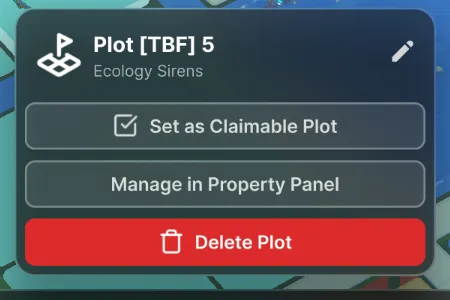
Open the Plot toolIt is in Land Planner, in the bottom-left toolbar.
Pick a plotPick a plot you manage on the map, or from Your managed plots.
Set it as claimableIn its popup, tick Set as Claimable Plot.
A member claims a cyan plot. Whether a society is invite-only is a separate setting.
A plot's popup in Land Planner. Taken , SEED 0.4.2.
The rules you meet once you hold a plot.
Who gets a claimable plot
Claimable plots are for new players only. Existing members get plots by transfer, and can move to another plot later. Sirens keeps some town plots for new people and sells others to existing members. Whoever buys a plot zones it themselves.
Shape and size
Claims are squares or rectangles, 4x4 tiles at minimum. Long skinny claims are allowed.
Merging and resizing
Plots can be split, merged or resized in the Land Planner, which needs land manager permissions. Two plots merge only if they touch and have the same owner, and the result must be a rectangle.
Growing a claim
Draw a new area, take ownership of it, then merge it with your plot. Housing Managers can extend claims, and so can some members without that role.
Limits
A plot with a building on it cannot be deleted. Changing someone else's plot gives a permission error.
Transfers
A plot can be transferred to a business or to a group, such as your own company.
Buying or renting
The real estate market lists properties to buy or rent, with the filters Private, Public, Homes and Branches.
Society land
The society grows by buying squares of land around the town with society money. You cannot buy a plot unless the leader allows that specific plot.
As of
Expansion cost
The first expansion was free and added a square the size of the existing society area. After that, each square in the 3x3 around town costs 20,000 SeedCoin, and the next ring out costs 500,000.
Large requests
A large plot request goes to town discussion.
Water nodes
Do not claim land that blocks a water node for others. Land is split so each claimant can reach a water node.
Mining on someone else's plot
It is hard, because other players may take the hauled output.
Sharing a property
A building cannot be both a business and a residence. Once a building's owner is a business, residents can no longer be assigned. You can sell from a single plot once it shows under Properties, so you do not need a second plot.
As of
Between your own Seedlings
Make a group and transfer the properties to it. A second Seedling still cannot sleep on the first Seedling's plot. Sleeping is the one access a group does not grant.
Letting another player in
Put you both in a group, or better, make them an Employee of the owning business rather than a Partner. Either way, the owner keeps their authorization.
Campfires
A placed campfire is not usable by others by default. Grant access to each person you want to use it.
Public spaces
Truly public plots get no work done, and when the society owns the land nobody can schedule work on it. Company-owned plots that grant public access work better. The Public Warehouse & Spaceport works this way. A member's company manages the land and pays people to work there, the society owns the buildings, and anyone can use it.
Roads
Place the road first and the building after. A road cannot go under a building that is already there, and buildings placed first end up out of line with the road.
As of
Where the tool is
Bottom left of the Land Planner view, the icon with two vertical parallel lines. Placing a road needs a role that holds the road permission, and no land claim.
Clear the ground
Harvest resource nodes and pick flowers first, or they block the road.
Straight lines
Each road section is a straight line. Each turn starts a new segment.
Cost
250 coins per block.
How a society starts
As of
Government
New empty societies start with an Anarchist Constitution by default. Laws are written by the society itself.
Leadership
The leader is the Camp Manager until the Camp tier, then the Mayor. Leader elections happen when the society tiers up.
Jobs matter
Seedlings work jobs (farming, wood processing, tailoring) that feed the society. If jobs go unworked, the society can collapse.
Tiering up
Once the construction materials are complete and the qualifying building is physically finished, the society reaches the next tier.
Each tier adds roles and rights, which the game lists as the tier's benefits.
Tier 2, Camp
Room for 15 Seedlings. The society votes for a Camp Manager first, and the Camp Manager then appoints a Housing Manager. Adults can own property.
Tier 3, Adv. Camp
Room for 20 Seedlings. The Camp Manager becomes the Mayor, with elections. The Mayor appoints a Treasurer to manage society finances. Adults can own businesses and start or vote on banishments.
Tier 4, Small Town I
Room for 50 Seedlings. The Housing Manager becomes the Urban Minister, with road and installation powers. Adults can rent property. Mayor elections run longer.
Tier 5, Small Town II
Room for 75 Seedlings. Adds the Legislator role, laws and a judge. Adults can vote on laws.
Tier 6, Small Town III
Room for 100 Seedlings.
Tier 8
The Mayor role gains the permission to found organizations.
Housing Manager
Manages housing and shelter, creates plots, and marks them claimable.
Urban Minister
Can create restock orders for government buildings.
Seizing land
A minister can seize property, and that only works on plots in the town. Even the Mayor cannot reach the items on another member's plot, except by seizing the whole plot.
Organizations
Criminals keep the right to found an organization.
The Societies panel has these tabs: Overview, Society Goals, Ballots, Finance, Statistics, Policies, Roles, Constitution and Moderation.
Who runs Sirens
Sirens fills its roles by election and by appointment. Most volunteer roles are open to anyone who signs up.
As of
Elections
The judge and the legislators are elected. There are 7 legislator slots.
Welcome
The Mayor greets new players and hands them a new-player gift.
Land managers
Land managers handle claims and roads. Ordinary members cannot change claims such as the community garden.
Volunteer roles
Farming and water volunteer roles are managed centrally. You sign up, and the organizer manages the rest.
Territory roles
Roles are attached to a territory, so there is one community medic role per territory. Anyone can sign up.
Government buildings
A building the government owns cannot be edited, for example to add a door. Access is granted one character at a time.
Discord
The Sirens Discord has a role for society members.
Building tiers and sizes
A building's material sets how big and how tall it can be. You can upgrade a building in place. In build mode, pick the upgraded material with one button.
As of
Tier 1, logs
Plain logs. A starter log house can be up to 60 blocks.
Tier 2, planks
Planks. The public warehouse's tier 2 build-up is exactly 100 blocks, the limit.
Tier 3, sanded planks
Sanded planks plus nails. This allows a 4-floor building.
Brick
Bricks add balconies and similar features. Upgrading to brick takes large amounts of water, clay and stone, made into clay bricks, mortar and stone tiles.
Glass
Not hard to make, but slow. Some members sell it.
Height
The maximum is 25 floors.
What counts toward size
Outdoor blocks count toward a building's block count. Objects in the outdoor part do not count toward the 60 limit.
Shacks
Any Seedling can build a Wooden Shack, which needs level 1. Shack Building will soon need level 50 for 100 blocks and 2 floors (2026-11-18).
Elevators
Elevators stack on one column. The placement ghost shows yellow but still lets you place it. Adding elevators gets laggy around floor 20.
How a build gets built
Seedlings build over time, and materials go in as they work. Order materials in balanced batches. A large order of one item fills the inbox and stalls the build.
As of
Zoned buildings
Other Seedlings build zoned buildings overnight. A house zoned only in logs gets built in logs.
Materials go in bit by bit
A build can start before all the logs are there. Logs leaving a pile at the site are going into the build. Seedlings are not stealing them.
Anyone can use the site's stock
Anyone working on a construction uses the materials stored at it. That includes neighbors whose build task is not limited to an area.
Sites are hard to track
Construction sites do not show in property search, and their inbox and outbox cannot be managed for transfers.
Cancelling
You lose the materials already put into the build.
Deleting a building
In Build mode, Ctrl-click its blocks. Or empty its inbox and outbox, then use Manage, Delete building. An inbox or outbox placed without snapping can block deletion. Placed items can be deleted too.
Once it is built
A new house is dirty inside. Sweep it a couple of times.
Members suggest:
Build the shell first and add the interior and windows later, to limit losses from crashes.
Ask for help with big builds. Building and gathering logs take a long time.
What buildings cost
Plan the materials before you start. Buildings can cost far more than you expect. The construction panel lists what a build needs. These are lists members saw.
As of
A modest dormitory
1,014 sanded wood, 798 iron nails and 798 wood joints.
A Light Industrial building
415 Sanded Wood, 400 Iron Nails and 400 Wood Joint, plus a Tailoring Bench and a Chemistry Station placed.
Large brick buildings
6,351 to 6,911 clay bricks, 2,991 to 3,406 mortar and 5,731 to 6,206 stone tiles.
Where bricks come from
A water pump, 2 mason tables and a brick furnace. Bricks are not made in the kiln.
A Clay Brick task
Makes 24 from Clay 2 and Murky Water. Work time 40s, processing 2m 40s, 3m 20s in total.
Bricks are heavy
500 bricks take around 1,000 storage volume, so you cannot buy 500 at a time.
Furnishing and keeping a home
Your Seedling can sleep in a tent. You need a true house only when you want a baby. The government gives away crude furniture, the absolute basics, from a public storage members may take from.
As of
Put the furniture in the house inboxThe Furnish button shows nothing while the furniture sits in a tent. It has to be in the house's inbox.
Press FurnishPlace the furniture from there.
Beds
There are many types, from Crude and Basic up to Cozy, Modern and Plaxin. A double bed is needed to try for a baby (see Having a baby). A bed in too bright a spot warns that your Seedling will only sleep there in a crisis.
Toilets and showers
Both can go inside houses. A toilet works without being set up as a service, but setting it up as one stops others picking it up and walking off with it.
Outdoors
Outdoor chairs become usable once you build an outside structure on the property. Some decorations cannot be placed outside.
Light
The game hints when a room needs more light. Windows work best. Candles give only about 10 cm of light and do not remove the darkness debuff. Bar desk lamps can be crafted, and copper plates go into the lights.
Wear and repair
Chairs break, and beds and bookshelves get worn. A broken bed can need plaxin sheets and a double mattress. A Modern Sanitation toilet from the space store needs 6 Plaxin Sheet and 3 Steel Pipe to repair, and success depends on Maintenance & Repair, Intelligence and Dexterity.
Members suggest
Put furniture repair supplies on auto restock, and give the house repair, haul and clean jobs.
Good to know
Engineering-made wall art does not count as furniture. Signs show their text only when hovered.
Storage
Set up every new storage object yourself. A storage that receives everything fills with valuable items other people made and random items Seedlings haul in. A stockpile set to accept all makes the Seedling take ownership of everything it briefly sees. See Storage rules.
As of
The Kernel
The society's Delivery HQ and starter storage, 10,000 units. Its settings toggle each category, such as Medicine, Raw resources, Raw materials, Plant matter and Waste. Sirens uses it for manual overflow, because automatic intake makes a mess.
Storage Platform
Holds 600 units.
Storage pallet
About 40 clay or about 10 unprocessed hematite. Processed raw iron stacks to 900+.
Orbital Storage
Temporary storage with a volume of 300.
Building outbox
1,000 volume, one per building, which pushes toward single-purpose buildings. It holds only about 60 lumber, so size 15 items are hard to stockpile.
Warehouse shelves
Small and large. A large one needs titanium, has three storage levels with 40% more capacity per floor area than a storage platform, and wears faster outdoors.
Restaurant Double Fridge
Slows decay of stored items by 50%.
Members suggest:
Put storage, the inbox and the outbox in the building's outdoor part. Delivery workers reach them without going in, and items there count as inside the building for crafting.
Use tables. They hold more per floor space than containers.
Keep containers clear of doors. One in front of a door can block Seedling pathing.
Make public stockpiles a higher priority than personal ones, so Seedlings do not shift goods into personal storage.
Set a pallet to accept nothing while you move storage.
Getting rid of junk
An item in an outbox with no sell order does not get picked up. Sell it or put it in the Kernel.
Renaming a stockpile
Use the three-dot menu at the top left. It is missing on ownerless society buildings, and on society property it needs a permission the Urban Minister holds.
Hauling
A Seedling with a storage interest hauls storage pallets around the society.
On mobile
Picking up items can fail with "Something went wrong". Use the PC client.
Machines, water and power
Moving a machine deletes all its jobs, and you set them up again. With at least two of the same building, copy-paste the settings. To move a machine into a house, carry it in your Seedling's inventory and walk inside, or transfer it to a storage inside the house.
As of
Power is coming
Many crafting benches will need power, with about 2 weeks notice promised before it is enforced (2026-11-18). The seed separator is the most likely to cause trouble without power planning.
Power needs
From the Utilities Setup panel: Water Filtration Unit 4 kW, Chemistry Station 12.2 kW, Milling Machine 5.3 kW, Tailoring Bench 16 kW, Weaving Loom 16 kW, Advanced Carpentry Station 16 kW, Advanced Workbench 16 kW.
Clean water
Water purification machines go inside a building and need plaxin to build. One batch of plaxin takes 14 clean water. A Small Water Filter handles clean water sources only, not waste water, and a typical task is 10 Clean Water (750ml).
Water pumps
A pump needs a water deposit underground. Without one it only makes Stone Dust. The Resource Scanner shows where deposits are.
Chemistry table
It gates much, including the basic anvil and metalwork. It uses a lot of clean water, which competes with drinking water.
Kiln and pottery
The kiln makes decorative items, and nearly all its recipes need Carpentry level 30. The pottery station makes only clay pots.
Other machines
A campfire can run on coal. The mineral separator is 6x more effective at sorting hematite ore. Tailoring makes clothes, cushions and backpacks, and backpacks are high-level and need composites.
What some machines take to build.
Medical fabricator
Iron bolts, made from hematite to raw iron to ingots to rods to bolts.
Weaving Loom
Iron Bracket 8, Iron Gear 11, Wood Dowel 40, Sanded Wood 17 and Arbor Assembly 3.
Pottery station
2 bearings, which need a metal lathe.
Oven
Crafted at the advanced workbench from 17 iron bolts, 27 iron nails, 14 stone blocks, 3 planks and 2 copper pipes, with no clay, and level 10 engineering labor.
Resource scanner
An electronics table, fiberglass and level 10 electronics.
Flower pot
1 clay and 20 ceramic tiles at a level 0 Pottery Station, in 10 minutes. Ceramic tiles go into about 20 items, including the chemistry station, the large furnace and the tailoring bench.
Moving or fixing benches
The tailoring bench needs an iron rod to repair or move. The chemistry table needs 2 copper plates to move.
A full metalworking or carpentry facility is very large, about the size of the public warehouse, because it needs a machine for every craft and a pallet for every resource. Plan its size from a list of every resource, one resource per pallet.
Public buildings
Anyone in Sirens can use the public buildings. The production buildings and a multi-floor public housing block share a plot with the spaceport.
As of
Public Craft Workshop
The public workplace, not the warehouse. Its outbox is used for handoffs.
Production buildings
A hard crafts workshop for lumber and stone, the Govt Clothing Workshop for flaxa, and a biomass processing building for plaxin.
Govt Mineral Stockpile
Storage for rocks and clay.
The public warehouse
Carpentry machines are inside and three stockpiles outside. The area holds a bunk house for beds, a hard-crafts zone for logs and stone, and a soft-crafts textiles zone.
Subway stations
They cannot go on private land, only on government (town-owned) land.
Society goals
Society goals move a society up a tier. Find them under Society Goals in the Societies panel. Sirens reached Town I by 2026-11-27.
As of
The organizer's goals for Sirens are stable food, water and health, a society open to the public, and every member's Seedlings kept alive, new joiners most of all. The endgame is the nicest-looking town possible.
What members make
What Sirens businesses list for sale and as services.
As of
Medicine
Remedies such as Muscle Relaxant, Advanced Burn Treatment Kit and Anesthetic, with a clinic to use them.
Mining and ironwork
Raw iron and copper, iron rods, bolts, brackets and nails, and stoves. One business buys ore and sells ingots.
Woodwork
Sanded wood, wood joints, dowels and poles. The society's plank seller makes planks whenever stock drops below 250. A business can be set to sell 20 logs constantly.
One store offers a Repair Service for humans, androids, machines and toasters, with a 0 entry fee (2026-11-11).
Jobs
Several businesses list open positions.
Working from home
Each of us picks a specialty and works it from home, instead of everyone crafting everything. Each home keeps its own stock and lists it from its outbox on local-only orders, so anyone in the society can buy what they need.
As of
Pick a specialtySet your home up for one line of work, such as farming, wood processing, or tailoring, and get good at it. Leave the rest to the people who specialize in it.
Set your home's inboxA new Building Inbox accepts nothing. Open its settings and allow the inputs your specialty uses, or deliveries stall.
Keep your stock at homeMaterials for your specialty, and what you make, live in your home's containers.
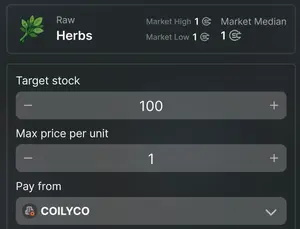
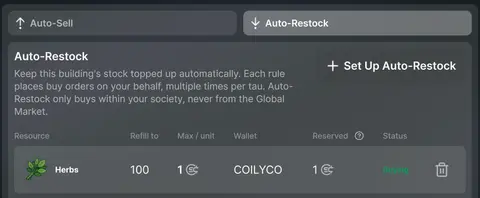
Trade through the marketSell what you make from your outbox with local-only orders, and Auto-Restock what you use. See Trading inside Sirens.
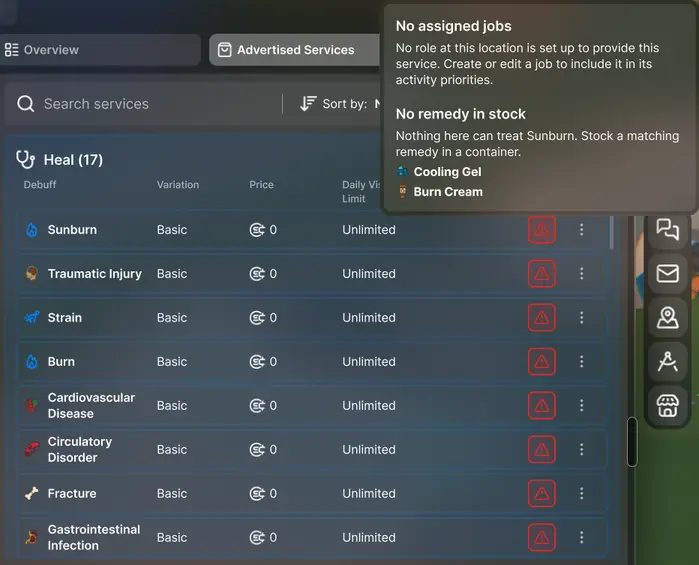
Offer services, not only goodsSome specialties are services. Healing is one: injured Seedlings come to your clinic for treatment instead of being handed a bandage. See Healing.
One industry per player
Members split industries among themselves, such as carpentry, or metals and processing. With only two Seedlings, pick one industry rather than running two large facilities.
Chain skills
A chemist Seedling can center on chemistry processing and tailoring, with water treatment, water harvesting, mushroom gathering, and coal and stone harvesting as chain skills. Many chemistry recipes use mushrooms.
Jobs in Sirens
You can take a paid job from your first day. Open Jobs, the button directly above Schedule. Available Jobs lists each position with its shift hours and wage, and filters by Qualified and Non-qualified. There are also Fallback Jobs and Current Jobs tabs.
Every job you hold pays at least 10 SeedCoin a day, and even one 1-hour job pays enough to eat and drink. Members suggest signing up for several jobs and letting your Seedlings run on autopilot.
As of
Minimum wage
10 a day for every job held, topped up automatically and shown as Minimum Wage Top-Up. It is set per tau, not per hour, so a job posted at 2 an hour still pays 10 by the end of the day.
Several employers
A Seedling can hold jobs from several employers at once.
Applying
Your own Seedlings can take your jobs right away. Other players' Seedlings must apply and be approved. An application can fail when it conflicts with another job.
Volunteer roles
Gardening and water treatment at the community garden and the hospital. Sign up, then clear your schedule for those hours.
Openings
More open positions than Seedlings, paying 4 to 200 a tau (2026-11-27). The world map shows the number of open jobs to people choosing a society to join.
The Sirens government runs 16 jobs on 4 public buildings on the Public Warehouse & Spaceport claim, 4 shifts each. They are built for brand-new joiners, except the biomass processing job. Government pay runs on a 5 to 20 payscale (2026-11-21).
Cleaning
Govt Bunk Tower
Cleaning beds and showers.
Needs Charisma, Stamina and Strength.
Shifts 03:00 to 06:00, 06:00 to 09:00, 14:00 to 17:00 and 17:00 to 20:00.
Hauling
Govt Mineral Stockpile
Hauling clay and stone.
Needs Strength, Stamina and Resilience.
3-hour shifts.
A shift pays 5 (1.7 an hour).
Tailoring
Govt Clothing Workshop
Needs Tailoring, Dexterity and Intelligence.
Shifts 03:00 to 06:00, 06:00 to 09:00 and 14:00 to 17:00.
Each shift pays 10 (3.3 an hour).
Chemistry
Biomass processing
Needs Chemist, Dexterity and Intelligence.
The one public building job not meant for brand-new joiners.
Delivery
Public Warehouse & Spaceport
3-hour shifts from 00:00, 03:00, 06:00, 13:00, 16:00 and 19:00.
Pays 10 (3.3 an hour). New players can join.
Emergencies
First Responder
03:00 to 06:00, pays 10 (3.3 an hour, 0% tax).
Needs Fire Suppression 5 and First Aid 5.
Government salary band tier 2, artisans and professionals.
The Legislator appoints it from among adults. It may enter any building in an emergency, works mainly around the kernel, and can get more slots for trained members.
If you run a business:
Shift sizes
3-hour shifts starting at 03:00, 06:00, 14:00 and 17:00 fit beside the government roles better than 1-hour or full-day jobs.
Delivery hours
A delivery business's agents work 8 to 5. A night delivery agent, or client deliveries in the night operator's priorities, covers the other hours. Delivery backlogs build over the weekend and usually take until Wednesday to clear.
A Sirens rule of thumb
A large business campus should offer a matching number of jobs that anyone can join, at a reasonable salary.
Set up a job at your business
Your Seedlings and other members' Seedlings work your machines through jobs. Each production slot needs its own job. A job set up badly leaves Seedlings idle or socializing.
As of
Main DetailsPick Hired Job, a paid shift where you hire from applicants, or Volunteer Position, an unpaid shift that qualifying Seedlings join. The name shows in a sidebar beside many other jobs, so pick one anyone can understand. Pay is set per tau, and a volunteer role pays 0.
SlotsSet the role's slots.
ScheduleChange hours later in the business Employment section by editing the job. A job block shows orange on the schedule. Add responsibilities under the Employment tab, the same way as schedule items. A job's responsibilities stay inside one location.
Required SkillsSkill requirements are the only filter in the jobs window, and they hide the job from Seedlings who do not qualify. View the list expanded on desktop to hide the qualifications line.
PermissionsGive the role Run machines, or its Seedlings cannot use your machines. Other permissions include Transfer buildings and plots, Manage storage, Plan deliveries, and Edit market orders. Who can take the role can be Any Seedling, Any member, Owner, or another role. For a volunteer role, allow anyone and need no approval, so everyone qualified sees it under Available Jobs.
Owner and Partner
A business has Owner and Partner roles. A Partner runs the business with the owner, but cannot end it, sell its property, or replace the owner.
The business panel
Shows employees, open positions, daily wages, and items for sale.
Farm and harvest jobs
Attach the job to the outdoor building, the branch land, not the property claim, because the branch does the hiring. A farm job on the property claim gives the hired Seedling no access to the field. Harvest jobs work the same way, on the outdoor building that holds the trees.
Rank your jobs
Rank the seed-making job above the farming job.
Volunteer roles
A business can create volunteer roles that people hold with no end date. A community business with unpaid volunteer roles helps new Seedlings level farming and gathering.
Moving goods between businesses
A job stays inside its location, so hauling between businesses works better as a delivery service or a contract. Jobs take a long time to set up by clicking, while contracts are quick once you know how.
Machines and production
A machine works its own task list, top first. Open it from Properties or Machine Details. It shows status, task count, efficiency, and a task list with Copy, Paste and New Task. When several tasks are ready, Seedlings pick the one higher in the list. Drag the handle to reorder.
As of
Run the machine
Tell Seedlings to run the machine and set product order in the machine's queue, rather than naming an item. One schedule can hold Run this machine at priority 1 and Craft this item at priority 2.
Produce uses the first item
A Produce task only works on the first item in the machine's queue. If the bench is set up for something else, the Seedling reports it and does nothing.
One item per table
A crafting table holds one task at a time. To get one item made, give it a table of its own, one task per table or mineral separator. Nails are a good case for this.
Set repeats
A craft set to run only 1 time stops production. Set repeats.
One building
The input storage, output storage and crafting table must all be in the same building. Storages in outside blocks count as being in the building.
Materials on the table
Seedlings do not craft when the material is not on the table. A haul action placed below the craft action brings specific items. A haul action can also block production, and removing one can restart a stuck crafting schedule.
Storage settings
A storage's settings window ticks accepted items and sets limits. An unlimited stockpile leaves no room to move items. Production worked with a Produce raw copper task and a storage set to accept only the ore and the raw copper.
Mineral Separator
It can be set to produce raw copper, and the companion app shows its status.
Harvest storage
For harvesting, a storage must be inside the house, inside the scheduled harvest area, and set to accept the farmed items.
Finding the problem
The scheduler info bubble lists each priority's problem, such as nothing to repair, nowhere to store, or needs water. The business task window shows each machine's tasks, missing resources, and a status such as Blocked with Resources not available in the building.
Zones
A zone can lock Seedlings to an area. Zones have a size limit and cannot say fetch from zone A and bring to zone B. An active harvest zone cannot be moved, so to retarget workers you make a new zone and edit every schedule entry that used the old one. A zone drawn over a road has Seedlings harvest it on schedule.
Hauling Anything
With Hauling set to Anything and nothing to haul, Seedlings move items between platforms at random, which spreads goods across every storage.
Stacking haul orders
Clay hauls 2 per trip. While a Seedling has a different active task, you can stack haul orders without waiting for its inventory to empty, or make it a transfer on the schedule.
Shared craft tasks
In the shared area, you can create recurring craft tasks for other Seedlings to pick up.
Plowing
A scheduled plow task can cancel itself. Add it again from the mobile app, and the Seedling resumes plowing once its energy is back up.
Building
Seedlings may walk past their owner's unbuilt building to build another member's.
Stone
A stone extractor bought on the market and placed on a stone vein mines stone largely by itself after a short start-up. Stone deposits are nearly everywhere.
Small Mineral Extractor
Shows a success chance. One extraction yields, for example, Chalcopyrite Ore x4 (80%) or Stone Dust x1 (20%).
Drill
For underground deposits, not surface nodes.
Skill gates
Engineering level 13 starts Electronics leveling, and Engineering level 30 makes an Electronics table. Iron brackets need Metalwork level 10 and two ingredients. Nails are the least demanding iron craft.
Medics
Low-level medical workers make mistakes.
Trading in and out of Sirens
Members sell to each other and, through the Sirens spaceport, to other societies. Members buy on the global market too. Auto-Restock is the one tool that buys only inside the society.
As of
Sell
From your outbox
Auto-Sell asks where to sell. Sirens (here) keeps the order inside the society. All Societies lists it on the global market.
Price floor is 1 SeedCoin. A price of 0 is refused.
A sell order has your Seedlings haul the goods into your outbox. Buyers draw from there.
Auto-Sell keeps one order listed and relists from outbox stock when it sells out.
Set production to "do until X in storage" so stock stops at X.
Buy
With Auto-Restock
Properties, your building, Marketplace tab, Auto-Restock, Set Up Auto-Restock.
Set target stock, max price per unit, and the wallet to pay from.
It buys several times per tau, only inside the society.
For a one-off, use New Order, Buy. Self Pickup needs a Seedling free to haul.
Buying from other societies goes through the spaceport.
Every buy needs SeedCoin in the paying wallet
Even a 1-coin order reserves money up front, and unused coin goes back to the wallet. A new business wallet starts at 0. Your inbox also accepts nothing until you allow the item.
Auto-Restock on screen
As of
Setting up a rule for Herbs. Taken , SEED 0.4.2.The rule once it is buying. Taken , SEED 0.4.2.
Storage rules
Tell each storage exactly what it accepts. Loose rules send items to places you did not expect, and items cannot be deleted.
As of
Never accept all
A storage set to "accept all" causes chaos, because Seedlings dump random harvests and valuables into it. The message "there is nowhere to store that" is a good sign.
Spread-out stockpiles
With stockpiles across the map, hauling rules have to be strict about what goes where, or items get hauled to unexpected places.
Items cannot be deleted
An accidental hoard has to be moved by hand.
Crops decompose
Flax and wheat decompose into biomass. The UI can show how long a batch has before it decomposes.
The Kernel
Anyone with access to the Kernel (Delivery HQ) can switch it to accept every item type. So Sirens keeps it set to accept nothing and turned off.
The warehouse
Its pallets accept building materials, garbage and flax.
Society money
The society has its own wallet. It fills from the sources under Income, and it pays for public buildings, wages and grants. Find it under Finance in the Societies panel.
As of
Income
Exports (the export tax), plot purchases, business tax, and achievements (objective rewards).
Spending
Public building work, item purchases, low income grants, Seedling wages, and global shipping.
The finance graph
Shows 7T, 30T and 90T ranges. T means tau, one in-game day.
Policies
Business Tax, Export Tax Law, High Balance Tax, Import Tax Law, Income tax, Land Tax (per 16 m² owned) and Low Balance Assistance. Business Tax takes 1% per real day above 25,000, and High Balance Tax takes 100 per real day above 10,000. An export tax applies to society trade.
Farmer Grants
The society pays a business 1 SeedCoin each time it produces 1 unit of Corn, Herbs, Pumpkin, Tomato or Wheat.
Low Balance Assistance
It helps members afford essentials like food and water. It pays 100 per Seedling seen in transactions.
Building for the society
The policy system cannot pay per activity, so the society does not pay builders back for public building work.
Running a business
Only a business can sell goods or offer services. A house cannot post a sell order, and the Public Warehouse is not a business. Set up your business before you try to sell.
As of
Who can own one
A business has one owner, a single person. Each cultivator can own 1 business.
Branches
You make a business branch only by transferring a building's ownership to the company. A building the company does not own cannot sell. Its Properties market tab says sell and buy orders are managed from a Branch building.
Keep it a business
Switching a property from a business to a group removes its ability to sell, and you have to redo Seedling schedules.
What a branch can do
The branch panel offers Crafting, Services and Deliveries. Crafting means you buy machinery, place it, assign a related task and an employee, and sell on the Market with a sale listing.
Services
Cafes, clinics and gyms advertise services that draw Seedlings in. A Seedling pays when an employee serves it.
Renting
Renting out buildings opens at Society Tier 4.
Roads cost money
About 250 a block (2026-11-10).
Finances
Export them as a CSV with the button at the bottom of the business page finances.
Needs attention
A page lists where you sell things. Its Needs attention section flags blocked machines, idle machines and full containers.
PAM, the in-game assistant, gives these steps to set up a service.
Start the service locationOpen it from the Properties Panel.
Pick services and pricesChoose what you offer and what each one costs.
Set your hoursSet the opening and closing hours.
Stock the containersPut the items you sell in containers at the location.
Business reviews
Seedlings rate businesses after a visit. You cannot rate a business yourself. Read your reviews to see what customers missed.
As of
Where to find them
The sparkle menu on the left, filtered by locations.
The Reviews tab
It shows the rating, the review count, the rating over time, and a How to improve list. Each item names what went wrong, such as customers who left without Traumatic Injury treatment. The fix is in Advertised Services: stock, staff, a public room or opening hours.
Selling from a business
A sell order goes live only once the goods sit in your business's Outbox. Payment is final only once delivery resolves. Sell everything you make that you do not use yourself. Surplus can go on the global market.
As of
Open the sell windowOpen it from the Marketplace or from Inventory. It takes the quantity, the price, and the business to sell from.
Check the plot shows under PropertiesA plot missing from Properties cannot be picked to sell from. Once it appears there, selling works.
Fill the OutboxAutomate this with a job that has a hauling task.
Order stages
Order placed, Goods in Outbox, Listed on market (visible to your Society), Sold, Delivery to buyers, Completed.
Tax
Income tax comes off each fill at the society's rate.
Lost goods
Goods can be lost in delivery with no refund.
Filling a buy order
It pays at once, at a slightly lower price than waiting for a buyer on a sell listing.
Built-in buyers
Seed Industries is a company the game runs. It posts buy orders, and it buys and sells only certain items. It does not buy ceramic. Orders at the same price fill first come, first served, so its orders win. A player buy order must be at least 1 coin higher than Seed Industries to get goods.
Deleting an order
A sell order not yet out for delivery can be deleted from Marketplace, My Orders, under the buy and sell tabs, near the bottom of the list.
Empty listings
An empty listing usually means the item sells fast, not that nobody sells it.
Set up Auto-Sell
Properties, your building, Market, New Auto-Sell.
Max units in outbox
Auto-Sell lists only up to this number, however much sits in the outbox.
Not instant
It updates its listing a few times per tau. The Auto-Sell page also has an Auto-Restock option.
When items will not list
Take the items out of the outbox and put them back.
Listing size
Small listings are slow to show. List a large quantity, even though it ties up more in escrow.
Buying and delivery
Bought goods land in the inbox of the building you pick. Someone then has to carry them, your own Seedling or a delivery business.
As of
Pick the destinationBuy the item and set the inbox, a property, as the destination.
Pick the deliveryChoose Self Pickup or a delivery organization. The picker shows each one's fee and its queue and agent counts.
Haul itThe goods show up later as a haul option in the inbox.
Auto-buy
It delivers the same way as a manual buy. You can set Auto-Restock to use a delivery business you choose.
Pay market rates
Buy orders fill only at market rates. Auto-Restock also fills only if someone makes and stocks the item.
Post a buy order
Post an explicit buy order for goods such as nails, rather than waiting for someone to deliver them.
Missing purchases
Check warehouse storage.
Local orders are slow
The seller cannot haul a local order and cannot see who is assigned to deliver it. Local sales have sat for more than 2 in-game days with little progress.
Self Pickup means you collect
If you buy with Self Pickup, collect the goods. Otherwise the seller's stock sits waiting.
Stuck in the outbox
Goods can stick in a seller's outbox if the assigned delivery business does not act on them. The Properties window has a delivery service view that shows failed deliveries.
Pickup order
Pickups run bottom to top. Courier deliveries do not block self delivery.
Run a delivery business
Turn on the Delivery Service toggle on your business, so others can pick it as their delivery partner.
Delivery fees
A delivery business charges per kilometre, for example 2 SeedCoin per km.
Delivery priorities
Put client deliveries at the top of your Seedlings' workday. Self-delivery counts the same as a client delivery.
Boxes outside
Delivery workers work only when they can enter the building, so put the inbox and outbox outside.
Hiring couriers
Hiring for a delivery contract can meet price increases and no available workers.
Shipping between societies
You need the society's spaceport to trade with other societies on Avesta. The Global Market stays locked for a society without one. A spaceport is placed with the City Planning tool in Land Mode, and its build needs 5 steel beams plus other materials.
As of
Shipment options, as seen on 2026-11-19. Each fee scales per 500 item volume.
Delivery times are in game hours. 24 game hours is about 60 real minutes. Even paid Express deliveries took 10 or more real minutes.
Countdown
Once goods reach the sender's spaceport, the business delivery window shows a countdown timer.
Express can be wasted
Paying for express delivery is wasted if the seller takes days to move the goods to their spaceport.
Shipping can cost more than the goods
It happens with cheap goods such as flower pots.
Relaying
Buying from space and delivering locally pays only if local buyers pay above median and a buy order is up.
Contracts
Contracts let businesses trade on a schedule. Find them under Business. Each business gets 10 contract slots.
As of
What you set
The partner, the deal, the delivery method, how often, the duration, and what happens if an exchange fails. A contract can recur.
Expiry
A contract proposal expires 7 real days after it is sent.
Sending
Members send contracts to each other. A contract does not arrive if the recipient's branch has been removed.
Moving one item
A contract can hand over an item such as an anvil. Dropping it at the Kernel is simpler.
Inbox, outbox and weight
Keep everything you sell smaller than your outbox. Inbox and outbox space is limited, and that limit pushes each home toward one specialty. Outbox space also fills with local orders nobody has collected.
As of
Volumes
Building inbox 1,000. Kernel 10,000. Spaceport inbox 500,000.
Lumber is heavy
60 lumber fills an empty inbox or outbox.
Item weights
Lumber, clay, coal and stone 15 lb. Wood planks and sanded wood 2 lb. Wooden joint 0.5 lb. Wooden peg and iron nails 0.2 lb.
Biomass
0.5 volume per unit, so 1,000 biomass is 500 volume.
Stockpiles
A stockpile holds only 40 of an item, so mining hundreds into piles makes clutter.
Outside a build zone
Resource collection there cannot be reliably automated. Items have to reach a stockpile owned by a business inside a build zone.
The Kernel
If the kernel is government owned, items in it can be hauled into any government building on the same plot and sold there.
Govt Mineral Stockpile
Anyone can use it. It buys and sells minerals at 1, so you can dump deposits that block a road there. It auto-restocks stone, clay, coal, scrap metal, tailings and slag, 40 units at a max of 2 each.
Machines need room
More mineral separators raise production speed. Room inside buildings is the limit.
Backpacks
The cheapest bag raises carry capacity from 45 to 60. That is 1 more ore (3 instead of 2), or up to 120 smaller items.
Shelf life
Fiberglass expires after about 30 real days, and sulfuric acid after about 7.
Market prices seen
Check the market yourself before you buy or sell. Prices are close to random in this young economy, and the global market made little sense for many goods, copper ones most of all. Each price below is in SeedCoin, with the day it was read.
As of
The Market button is on the right. Switch its filter to local to buy from players in town, or type Sirens in the search to see only local stores, for both sell and buy orders. You still click through each item. The local filter can hide a listing you expect to see. Large buy orders show under Market, then Demand.
Game-run sellers
Buying from the game's own seller is very expensive. Copper plates for one floor lamp would cost about 802 (2026-11-14).
Clean Water (750ml) median 10, Murky Water (1000ml) median 5 (2026-11-14). The clinic's Clean Water auto-sell is priced at 10, the market median (2026-11-17).
Medical
Heparin Gel 33, Glucose Tablets 74 (2026-11-14).
Seeds
Tomato seeds 420 each (2026-11-12).
Wood
Wood Planks median 10 (2026-11-14). Lumber median 15 (2026-11-21).
Nails
Seed Industries buys iron nails without limit at 11 each (2026-11-13). Iron nails sell for about 12, against about 2,000 for a steel beam, so buying nails is cheaper than making them (2026-11-22).
Copper
Copper plate buy orders at 400 and up (2026-11-14). Global buy orders for copper ingots at about 1,800 (2026-11-15). Copper bars auto-sold at about 1,799 each (2026-11-19).
What food sells
Only about 40% of cooked foods had buy orders, and no raw crops did (2026-11-20). Boiled corn at 5 is barely worth exporting. Processed foods can sell for about 100 from 20 of ingredients, and keep longer.
Tools
Resource Scanner 1,999, Power Cell 40, Oven 1,000 under Processors (2026-11-14). The Resource Scanner is cheap for what it does. Use it to find sites for water pumps and mineral extractors.
Money and Pollen
SeedCoin is the money you trade with. Pollen is the store currency you buy with real money, and you can sell it for SeedCoin.
As of
Starting money
New Seedlings start with about 1,000 coins (2026-11-11). The help center puts a new Seedling at 2,500 SeedCoin, see Raising a baby.
Selling Pollen
You can sell it only in lots of 25. The starting Pollen sale brings about 250,000 (2026-11-17). Sell Pollen once for a one-time cash injection. Leveling up gives free Pollen.
Pollen packs
Packs come in 50, 100, 220 and 500. By one member's math, the 220 and 500 packs are better value per Pollen, and the 50 and 100 packs are poor value.
What Pollen buys
Pollen can buy bathroom fixtures. Pollen store items have only sell orders on the market, no buy orders, except founder goggles.
Moving money
You can transfer money from a secondary Seedling to a main Seedling.
Grant
Sirens has a low-income daily government grant.
What Sirens needs
If you are picking a specialty, start here. These are the gaps members found in the Sirens market, each with its date.
As of
Shortages
Pharmacy goods (about 20 low-volume item types), metal artisan goods, furniture and crafting tables, mushrooms and fungus, chemistry supply chains, paint (none even on the global market), and high-end electronics (2026-11-20).
Medical inputs
Nobody in the society sold sugar, salt or algae, which medical production needs (2026-11-14).
Hidden gaps
An item nobody lists does not show on the market at all, so only about a third of craftable objects appear there. Some items, such as a vending machine, cannot be crafted, harvested or bought.
Food for sale
Free shared food breaks the chain, because crops get eaten before seeds are made. Sell food on restricted business grounds instead.
Materials worth knowing before you pick a line of work.
Steel
Steel beams and steel rods are needed. A Syringe recipe makes 24 from 2 Glass and 10 Steel Rod.
Silver
Basic circuits need silver.
Sulfuric acid
Higher-end ores need it. It is made from graphite powder and water, and gives back dirty water when used, 10 acid in for 10 dirty water back.
Plaxin
Made from biomass and filtered water.
Flaxa
Basic Shorts take 80 Flaxa Thread and a Cozy Beanbag takes 40, so clothing and soft furniture use a lot of flaxa.
Healing
Healing is a service. A clinic advertises a Heal service for each condition and treats Seedlings with remedies from its own stock. Patients get there through their own schedule: every member books a daily clinic block with Seek Treatment first. The clinic has to be listed under Service Locations, and the block has to fall inside its medic's hours (see Clinic hours).
As of
Business, Services, Advertised Services. Each red icon marks something missing. Hover it to see what. Taken , SEED 0.4.2.
Set up HealBusiness, then Services, then Advertised Services. Heal covers 17 conditions, and the price can stay at 0.
Stock the remediesEach condition needs its remedy in a container at the clinic. Hover a row's red icon to see which one. Sunburn takes Cooling Gel or Burn Cream. Traumatic injury uses several remedies, including a Splint and a Penlight.
Assign the jobA role under Employment has to include the service in its activity priorities, or nobody treats patients.
Clinic and diner hours
A clinic's page can say Open 24 hours, but a patient is treated only while a medic is working. The clinic is open 06:00 to 12:00, 6 hours, so your clinic block has to fall inside those hours. The territory medic role and the First Responder job cover 03:00 to 06:00.
The diner is open 12:00 to 18:00, 6 hours. The lunch rush runs 12:00 to 14:00, with double staff and food made fresh beforehand. The evening flex runs 14:00 to 18:00, with slower service. The diner has no entry fee (2026-11-26).
As of
The clinic's listing: open 06:00 to 12:00. Taken , SEED 0.4.2.
Running the clinic
A clinic needs a doctor on site, a building that keeps patients content, and a steady supply of medicine. Treatment needs facilities as well as supplies. Services are not free. The Sirens clinic charges a 20 entry fee (2026-11-21).
As of
The doctor's job
Keep medicine stocked, give it to patients, and stay in the office. A doctor must wait inside the clinic during open hours. Crafting stations inside give the doctor work between patients. Schedule extra idle time so the doctor is free when patients arrive.
Supplies
Delivery works better than self pickup for clinic supplies.
Services
A location can advertise at most 32 services.
Light
Dark spaces upset Seedlings, so light the clinic.
Practice skills
The same page has 14 Practice Skill services, such as Wound Care and Dentistry. These are different: the visitor trains their own skill on equipment you place, and nobody gets treated. Keep remedies in a private room, or visitors help themselves and skip your healer. Practice equipment goes in a public room.
As of
The Sirens clinic offers Practice Skill services for First Aid, Fire Suppression and Fire Safety, with unlimited daily visitors. Skill books are kept there for training (2026-11-16).
Clinic supplies
Do not sell off all your bandages. Injured Seedlings arrive needing them soon after the last ones sell.
As of
How many medicines
About 50 kinds, each with its own inputs. The starting ship supplies hold about 8 kinds and no splint. Some injuries need medicine you have to make, such as muscle balm from a medical fabricator.
What goes in
Medicine takes a lot of herbs, and some needs thread. The Medical Fabricator makes remedies such as Nutrient Drip, Oxygen Mask and Painkillers from herbs, sugar, raw algae, clean water and glass.
Band-aids
Cuts need band-aids.
Benches
A medic can queue the meds a patient needs and pull them to the top of the queue. A medical fabricator sits in the public warehouse (2026-11-19). A medicine maker wants 4 or more.
Getting together
Sirens plays together, in the game and on Discord.
As of
Lunch at the arcade
A member's arcade, with 2 arcade machines, hosts a daily lunch hang (2026-11-22).
Watch along
A member streams the game world, so others can watch and join in from a phone.
Work parties
Put a public table with the materials on it or beside it and the jobs already queued, so helpers bring only labor.
Guides
A six-part business production guide is pinned in the Sirens SEED channel.
Age-restricted channel
The Sirens SEED channel on Discord is age-restricted, because a screenshot there showed double-bed interaction options.
Part 5
About this guide
How this guide is made
SEED has no public API, so nothing here is read from the game. The guide is written from what members type in and from screenshots, and a fact taken from one says when. SEED's Terms of Use do not allow bots, macros, scripts or other automation, and nothing here uses any.
As of
Dates and game versions
Every section says the date of its newest fact, and many facts carry their own date. The date tells you the game version. A date from 2026-11-09 to 2026-11-15 is SEED 0.4.1. A date from 2026-11-16 to 2026-11-23 is SEED 0.4.2. A date from 2026-11-24 on is SEED 0.4.3. A fact that a later message, a patch or the society overtook has been replaced, not kept.


 SEED